

Përshkrim
Toofan Stage-to-Live Sync is a selective staging to live migration plugin for WordPress, built for developers and agencies who need to deploy specific content changes to production without the risk of a full-site push.
If you’ve ever built or edited a page on a local or staging copy of a site, you already know the problem: almost every staging and migration plugin only knows how to push or pull the entire site. That’s fine for a brand-new build, but it becomes risky — and often impossible — the moment a store has live orders, a blog has live comments, or a client is editing content directly on production.
Publish content from your local or staging site to your live site without giving anyone direct access. Move a post, a page, or a WooCommerce product from one WordPress install to another — no FTP, no database exports, no shared logins, and no access headaches. You choose exactly what goes live; Toofan Stage-to-Live Sync handles the rest, and everything else on live — orders, customers, coupons, other pages, other content — is left completely untouched.
Why developers and agencies use it for staging to live deployments:
- True selective push — pick individual posts, pages, or products instead of syncing or overwriting the whole site.
- Safe WordPress content migration — live orders, comments, and customer data are never touched, so it’s safe to use on active stores.
- Works as an Elementor staging plugin, too — Elementor’s own data and images are detected and remapped automatically after each push.
- WooCommerce-safe by design — orders, refunds, coupons, and subscriptions are hard-excluded at the code level, not just hidden in the UI.
- No shared hosting access needed — connect two WordPress sites with a URL and a private API key instead of FTP or database credentials.
Perfect for:
- Freelance WordPress developers pushing client edits from a local environment to a live site.
- Agencies running staging-to-production workflows across multiple client sites.
- WooCommerce store owners who need to update content or products without ever touching orders.
- Elementor designers who build pages on staging and deploy the finished design straight to live.
Core features:
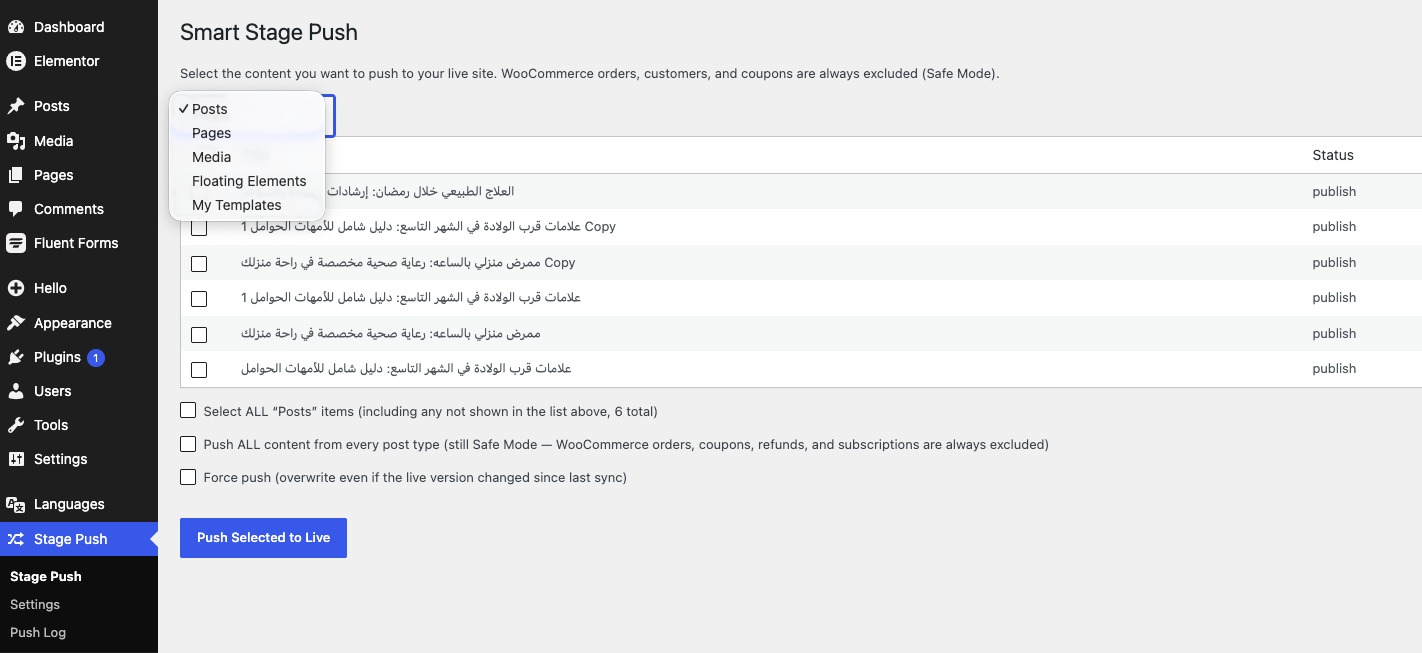
- Selective Content Push — a simple checkbox screen to choose exactly which posts/pages/custom post types to push, per post type.
- Smart Database Merge — pushes are merged field-by-field into the matching live post (matched by a persistent sync ID), never a full overwrite. Anything on live that wasn’t part of the push stays exactly as it was.
- WooCommerce Safe Mode — orders, refunds, coupons, and subscriptions are hard-excluded from every push at the code level. They are never touched, no matter what you select.
- Inline Media Sync — automatically finds every image/file referenced inside the page content (or Elementor’s data) using the real attachment ID whenever possible (not just URL-guessing), imports it into the live Media Library if it doesn’t already exist there (matched by file hash, so nothing is duplicated), preserves the original image size (so responsive
srcsetkeeps working instead of collapsing to one size), and rewrites the URLs to point at the live copy. - Placeholder fallback — if a specific file genuinely can’t be downloaded/imported (e.g. it was removed, or the source became unreachable mid-push), the page still shows a clean “image not synced” placeholder instead of a broken image icon, and the push log tells you exactly how many files used a placeholder so you can fix and re-push.
- Elementor-aware image remapping — if the page was built with Elementor, the plugin updates Elementor’s internal image ID/URL references after import and clears that page’s Elementor CSS cache so it renders correctly on the first load.
- Conflict detection — if someone edited the live version of a page after your last push, Toofan Stage-to-Live Sync flags a conflict instead of silently overwriting it. You choose to “force push” only when you’re sure.
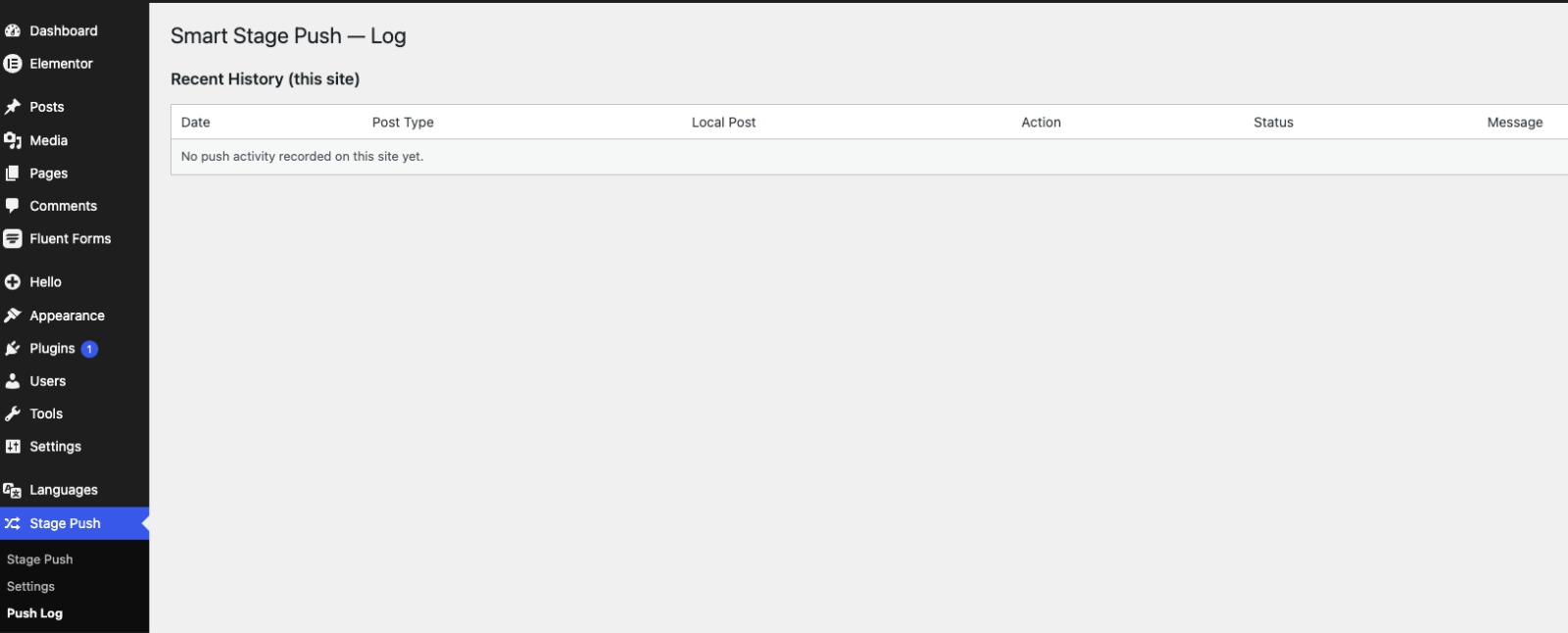
- Push log — a full history of every push: what was pushed, when, and whether it succeeded, was skipped, or hit a conflict.
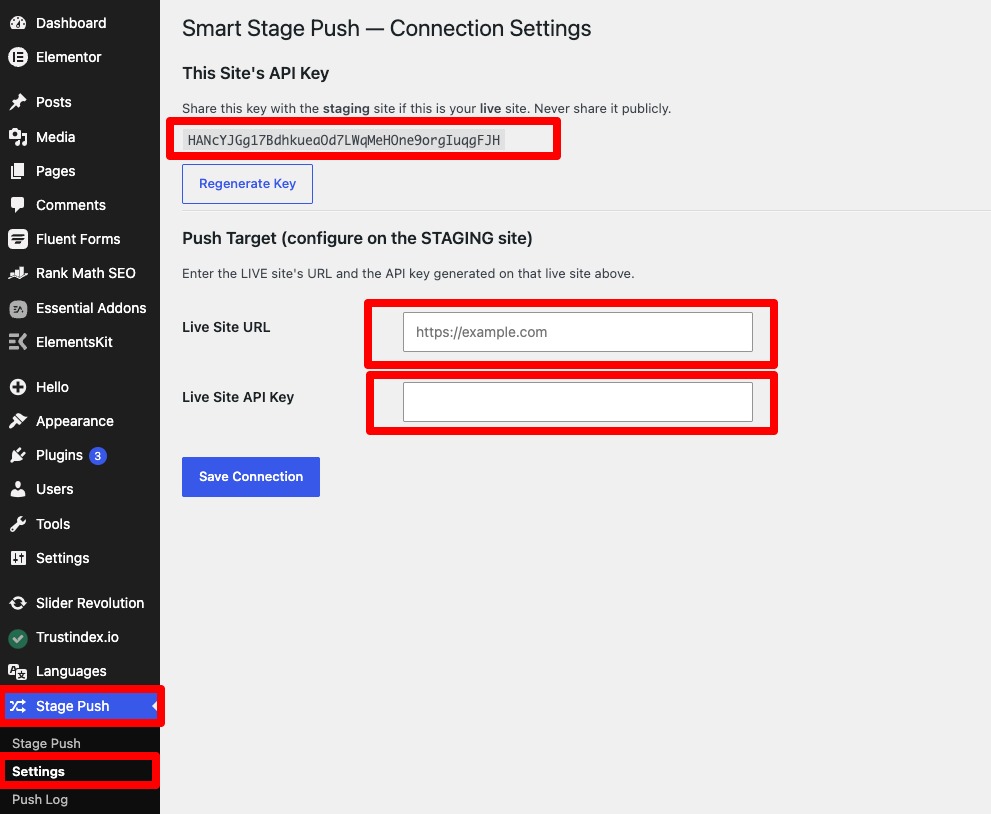
How it works: install the plugin on both sites (e.g., your local WordPress install and your live server). Generate a connection key on the live site, then enter the live site’s URL and that key in the settings on your local/staging site. From then on, use the Toofan Sync screen to select and push individual pieces of content whenever you’re ready — no full-site sync required.
This plugin communicates only with the URL you configure (your own live site), using WordPress’s built-in REST API over HTTPS with a private key you control. It does not send data to any third-party server.
Foto ekrani
Instalim
- Upload/install and activate Toofan Stage-to-Live Sync on both your local/staging site and your live site.
- On your live site, go to Toofan Sync Settings and copy the automatically generated API key.
- On your local/staging site, go to Toofan Sync Settings, and enter your live site’s URL plus the API key you just copied.
- Go to Toofan Sync on your local/staging site, choose a post type, select the item(s) you want to push, and click Push Selected to Live.
- Open Toofan Sync Push Log to confirm what happened, including how many inline media files were imported and whether any placeholders were used.
PBR
-
Will this overwrite my WooCommerce orders or customers?
-
No. Orders, refunds, coupons, and subscriptions are hard-excluded in the plugin’s code and can never be pushed, regardless of what you select.
-
Will it overwrite the rest of my live site?
-
No. Only the specific post(s)/page(s) you check in the Toofan Sync screen are sent. Everything else on the live site is left exactly as it is.
-
I used Elementor to build the page. Will the images and design come across correctly?
-
Yes. Toofan Stage-to-Live Sync reads Elementor’s own image ID/URL pairs directly out of its data (instead of guessing from the URL), imports the actual files into the live Media Library (skipping any it already has), and updates both the URLs and Elementor’s internal image references so the page renders correctly.
-
Why did some of my images not import?
-
Most commonly this happens when the local/staging file genuinely couldn’t be downloaded (it was moved/deleted, or your live server couldn’t reach the file at push time). In that case Toofan Stage-to-Live Sync now shows a clean placeholder image instead of leaving a broken image icon, and the Push Log tells you how many files fell back to a placeholder so you know to check and re-push. If you’re seeing 0 imported for images that do exist, make sure the images were inserted through the Media Library (not pasted as raw external HTML), then re-push.
-
Will responsive image sizes (srcset) still work after a push?
-
Yes. Toofan Stage-to-Live Sync transfers the original full-size file and then matches each size your content references (thumbnail, medium, large, etc.) to the equivalent size generated on the live site, instead of collapsing every size down to one image.
-
What happens if the live version was changed after my last push?
-
The push is flagged as a conflict and rejected by default, so you don’t accidentally lose a live edit. Check “Force push” if you want to overwrite it anyway.
-
Does my local site need to be publicly accessible on the internet?
-
No. Your local/staging site is always the one that initiates the push to your live site’s REST API, so it only needs normal outbound internet access. Your live site never needs to reach into your local environment.
-
Does this plugin send my data anywhere other than my own live site?
-
No. It only communicates with the URL you configure yourself in Settings, using a private key you generate and control.
-
Does it work with custom post types?
-
Yes, any public post type is selectable in the Toofan Sync screen.
Shqyrtime


Kontribues & Zhvillues
“Toofan Stage-to-Live Sync” është software me burim të hapur. Në këtë shtojcë kanë dhënë ndihmesë personat vijues.
Kontribues
Përkthejeni “Toofan Stage-to-Live Sync” në gjuhën tuaj.
Ju intereson zhvillimi?
Shfletoni kodin, shkarkoni depon SVN, ose pajtohuni përmes RSS-je te regjistri i zhvillimeve.
Regjistër ndryshimesh
1.0.0
- Initial public release.
- Selective Content Push, Smart Database Merge, WooCommerce Safe Mode.
- Inline Media Sync for images/files referenced inside page content or Elementor data, using the real attachment ID directly (from the editor’s
wp-image-IDclass and from Elementor’s own id/url pairs) instead of guessing from URLs, so images import reliably. - Responsive image sizes (srcset) are preserved individually instead of collapsing to the full-size image.
- Placeholder-image fallback for any file that genuinely can’t be imported, so pages never show a broken image icon instead.
- Lightweight Elementor-aware image ID/URL remapping and CSS cache clearing, with correctly-escaped meta/content saving so the pushed design renders identically to the source.
- Conflict detection with force-push override, and a full push log reporting imported vs. placeholder counts.