Hidhu te lënda
WordPress.org

Shqipëri

  • Tema
  • Shtojca
  • Asistencë
  • Mbi
  • Merrni WordPress-in
Merrni WordPress-in
WordPress.org

Plugin Directory

WP ShareX

  • Parashtroni një shtojcë
  • Të parapëlqyerat e mia
  • Hyni
  • Parashtroni një shtojcë
  • Të parapëlqyerat e mia
  • Hyni

Kjo shtojcë s’është testuar me 3 hedhjet e rëndësishme të fundit në qarkullim të WordPress-it. Mund të mos e mirëmbajnë më, ose mundet të mos mbulohet më dhe mund të ketë probleme përputhshmërie, kur përdoret me versione më të freskët të WordPress-it.

WP ShareX

Nga joomdev
Shkarkim
  • Hollësi
  • Shqyrtime
  • Instalim
  • Zhvillim
Asistencë

Përshkrim

WP ShareX is an advanced WordPress Social Share plugin enables you to add social share buttons on Posts and pages. You can assign buttons on Top of the Content, Bottom of the Content, Sidebar and on media.

Features of WP Social Share by JoomDev
1. 24 Social Network
2. You have the option to select either Icons or Icons with Text
3. 3 Button Shapes
4. 4 Button Animations
5. URL Shortening Option with Bitly and Goo.gl
6. Embed Twitter Handle and desired tags with Tweet
7. 4 Button display Location e.i. Top of the Content, Bottom of the content, Media, and Sidebar
8. Hide On Mobile Ability
9. Default Share Count Option. (You can play with your user’s mind)
10. Encourage your Audience to share your content with Share Incentive Feature

Foto ekrani
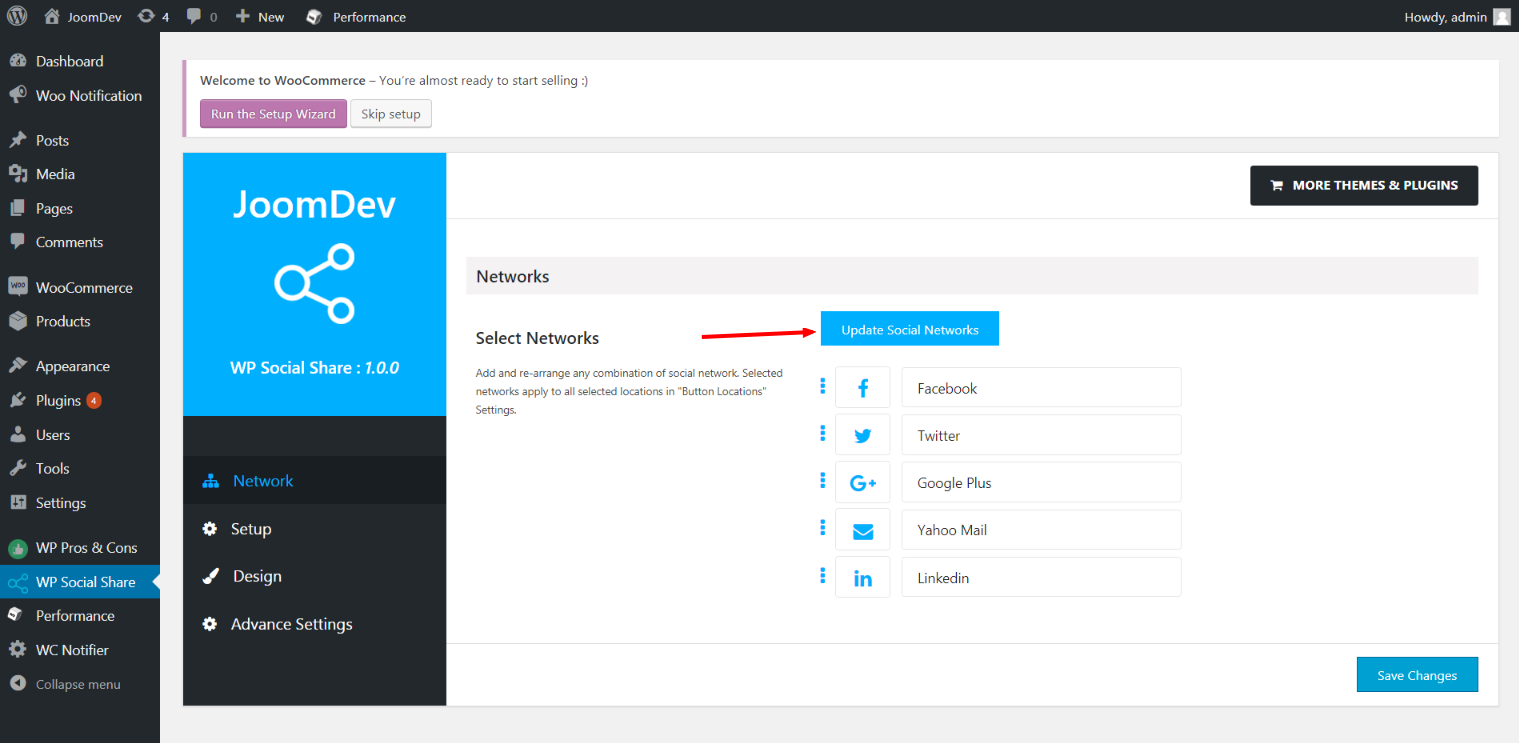
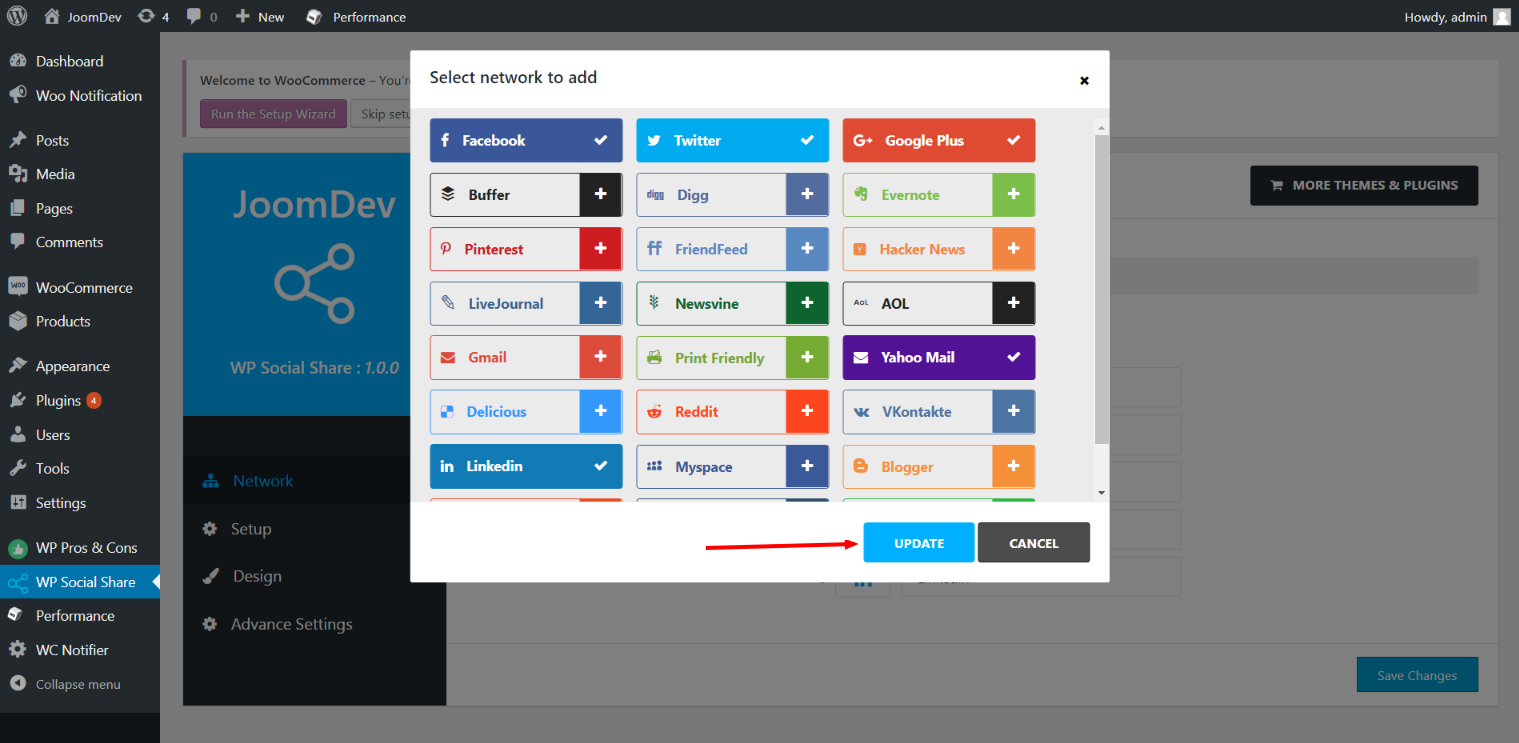
Click here to select networks
Update networks after selecting them.
Setup plugin and api settings.
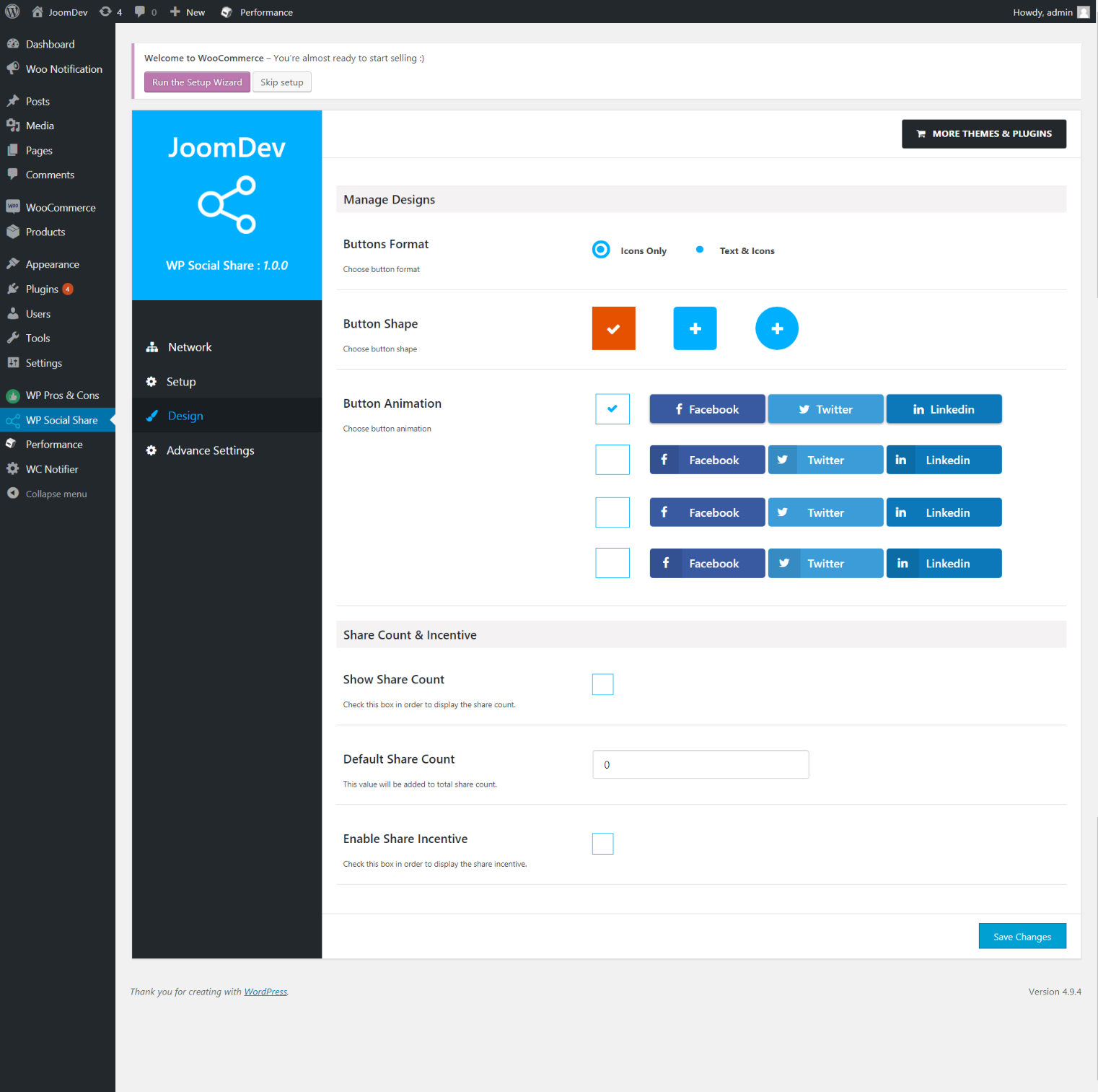
Select any design to display the buttons.
For mobile
For mobile

Instalim

Way 1: 1. Upload joomdev-wp-social-share.zip to the /wp-content/plugins/ directory 2. Extract the zip file. 3. Activate the plugin from wordpress plugins page. And you have done.

Way 2: 1. Go to plugins page in admin. 2. Click on Add New button. 3. Search for “WP ShareX”. 4. Click install on WP Social Share. 5. Activate the plugin.

PBR

Installation Instructions

Way 1:
1. Upload joomdev-wp-social-share.zip to the /wp-content/plugins/ directory
2. Extract the zip file.
3. Activate the plugin from wordpress plugins page. And you have done.

Way 2:
1. Go to plugins page in admin.
2. Click on Add New button.
3. Search for “WP ShareX”.
4. Click install on WP Social Share.
5. Activate the plugin.

How do I use this plugin?

See description.

Shqyrtime

Excellent!

Arnab Mohapatra 16 Mars, 2018 1 përgjigje
Incredible plugin. It allows to add any sharing button on the page simply and fast!
Lexoni 1 shqyrtimin e vetëm

Kontribues & Zhvillues

“WP ShareX” është software me burim të hapur. Në këtë shtojcë kanë dhënë ndihmesë personat vijues.

Kontribues
  • joomdev

Përkthejeni “WP ShareX” në gjuhën tuaj.

Ju intereson zhvillimi?

Shfletoni kodin, shkarkoni depon SVN, ose pajtohuni përmes RSS-je te regjistri i zhvillimeve.

Regjistër ndryshimesh

1.0.0

  • New Plugin initialized.

Të tjera

  • Version 1.0.0
  • Përditësuar së fundi më 8 vjet më parë
  • Instalime aktive 10+
  • Version WordPress-i 3.0 ose më i madh
  • E provuar deri me 4.9.29
  • Gjuhë
    English (US)
  • Etiketa
    sharesocialsocial share
  • Pamje e Thelluar

Vlerësime

5 nga 5 yje të mundshëm.
  • 1 shqyrtim me 5 yje 5 yje 1
  • 0 shqyrtime me 4 yje 4 yje 0
  • 0 shqyrtime me 3 yje 3 yje 0
  • 0 shqyrtime me 2 yje 2 yje 0
  • 0 shqyrtime me 1 yje 1 yll 0

Your review

Shihni krejt shqyrtimet

Kontribues

  • joomdev

Asistencë

Keni diçka për të thënë? Ju duhet ndihmë?

Shihni forum asistence

Dhuroni

Do të donit të përkrahnit shpënien më tej të kësaj shtojce?

Dhuroni për këtë shtojcë

  • Rreth
  • Lajme
  • Strehim
  • Privatësi
  • Shembuj
  • Tema
  • Shtojca
  • Modele
  • Mësoni
  • Asistencë
  • Zhvillues
  • WordPress.tv ↗
  • Përfshihuni
  • Veprimtari
  • Dhuroni ↗
  • Pesë për të Ardhmen
  • WordPress.com ↗
  • Matt ↗
  • bbPress ↗
  • BuddyPress ↗
WordPress.org
WordPress.org

Shqipëri

  • Vizitoni llogarinë tonë X (ish Twitter)
  • Vizitoni llogarinë tonë Bluesky
  • Vizitoni llogarinë tonë Mastodon
  • Vizitoni llogarinë tonë Threads
  • Vizitoni faqen tonë në Facebook
  • Vizitoni llogarinë tonë Instagram
  • Vizitoni llogarinë tonë LinkedIn
  • Vizitoni llogarinë tonë TikTok
  • Vizitoni kanalin tonë YouTube
  • Vizitoni llogarinë tonë Tumblr
Kodi është Poezi.
The WordPress® trademark is the intellectual property of the WordPress Foundation.