

Përshkrim
Simple Login Custom is a simple plugin that lets you create a custom login and registration system, fully managed via shortcodes. Ideal for basic customization needs!
Key Features:
- Custom Login Form: Customize the appearance of your login form with ease.
- Custom Login Link: Add a custom link to your login page anywhere on your site using a shortcode.
- Style Customization: Adjust colors, widths, and styles directly from WordPress settings.
- Recent Login Tracking: From version 1.5.0, track the ten most recent logins for improved security monitoring.
- Built-in Registration Management: Users can register directly via the same login form.
- SIRET/DUNS Verification: From version 1.6.1, choose between SIRET, DUNS, or no verification for companies during registration.
- Dynamic Fields for SIRET: From version 1.6.2, “Last Name” and “First Name” fields are added to the registration form if the SIRET option is chosen. These fields are required only if SIRET is filled in.
- Welcome Banner and Email: From version 1.6.2, a styled welcome banner is displayed after registration and a custom welcome email is sent.
- Automated SIRET Token Management (New): From version 1.6.4, validation of Consumer Key and Secret fields, automatic OAuth2 token generation via the INSEE API, a token generation test button, cURL error handling, and automatic token renewal every 6 days via cron.
How It Works:
- Go to Settings > Custom Login Settings in your WordPress dashboard to customize your login form, your link, and configure SIRET/DUNS verification.
- Use the
[customlogin_form]shortcode to display your custom login form on any page. - Use the
[customlogin_link]shortcode to create a custom link to the login form with your preferred text.
Installation:
- Download the plugin files to the
/wp-content/plugins/directory. - Activate the plugin via the ‘Plugins’ menu in WordPress.
Settings:
- Access customization options via Settings > Custom Login Settings. Here you can adjust the form style, configure custom text for your login link, review recent login attempts, and manage SIRET/DUNS verification settings.
Recommended Plugins
To improve user experience and the ergonomics of your site, here are plugins we recommend for their synergy with Simple Login Custom:
-
Page Scroll to ID: This plugin is perfect for creating smooth and intuitive navigation on your site. It allows users to click links to scroll the page to a specific element, which is ideal for content-heavy pages or single-page sites. Compatibility with Simple Login Custom ensures that even after a login or redirect, users can still navigate effectively.
-
LoginWP (Formerly Peter’s Login Redirect): Designed to manage redirects after login or logout, LoginWP is essential for customizing the login experience. You can redirect users to different pages based on their roles, capabilities, or even specific rules. This strengthens security by preventing unauthorized access to sections of the site and integrates perfectly with Simple Login Custom for a smooth and secure login experience.
Why these plugins?
- Ease of Use: Both plugins are known for their intuitive interface and ease of integration with WordPress, making customization accessible even to users without in-depth development knowledge.
- Improved User Experience: Page Scroll to ID improves navigation on your site and ensures an optimal user experience.
Foto ekrani

Custom Login Form: Preview of the modified login form. 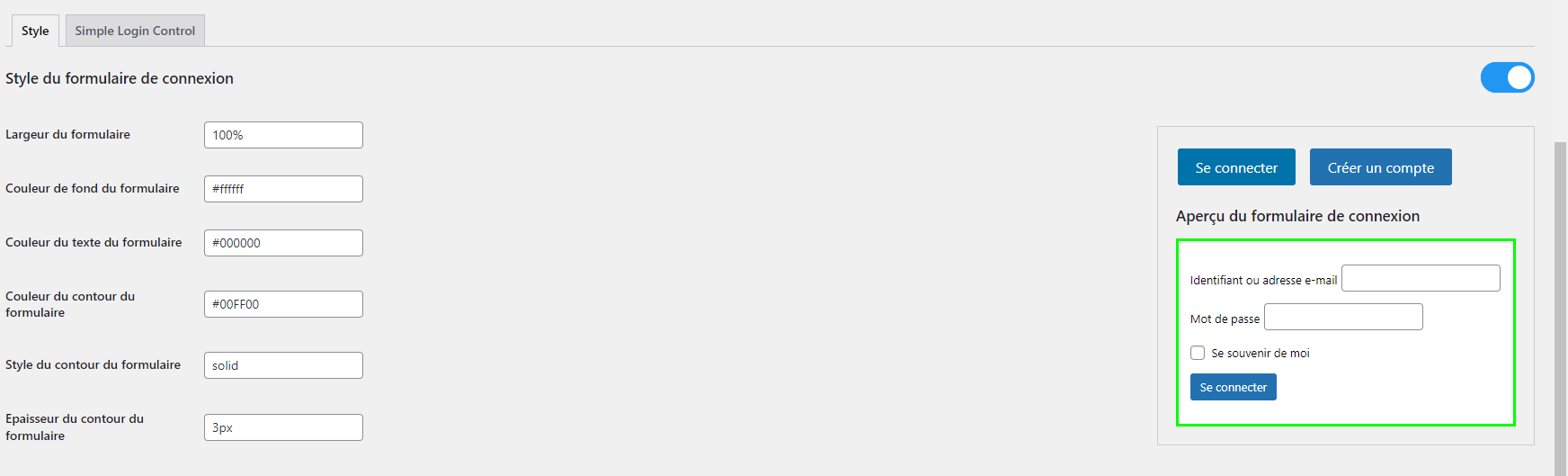
Customization Settings: Settings interface for customizing login and registration options. 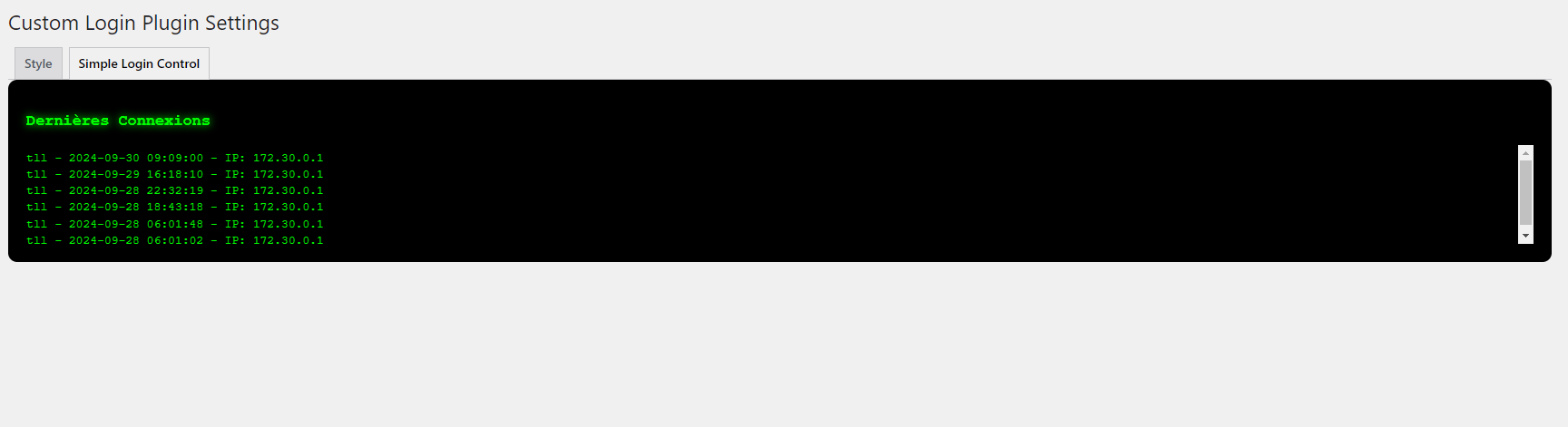
Recent Login Tracking: Interface showing the ten most recent recorded logins.
PBR
-
How can I customize the login form style?
-
You can go to Settings > Custom Login Settings in your WordPress dashboard to adjust the colors, widths, and style of the login form.
-
What is the ten last logins tracking?
-
Since version 1.5.0, our plugin offers a new feature to monitor the ten most recent logins to your site. This helps strengthen security by allowing you to keep an eye on login activity.
-
Can I use this plugin with other security plugins?
-
Yes, Simple Login Custom is designed to work harmoniously with other security plugins. Just make sure the plugins don’t conflict on the same features.
-
How do I insert the login form into a page?
-
Use the
[customlogin_form]shortcode in the page or post editor where you want to display the custom login form. -
Does customization affect the security of the login form?
-
No, any style customization does not modify the intrinsic security of the login process, which remains compliant with WordPress security best practices.
-
Can I change the login link text?
-
Absolutely! In the plugin settings, you can modify the text that will appear as the link to your custom login form.
-
How do I configure SIRET verification?
-
In Settings > Custom Login Settings, select the SIRET option, enter your Consumer Key and Secret, and test token generation with the “Test Token” button. The plugin will automatically generate and renew the token via cron.
-
How can I report a bug or suggest a new feature?
-
You can contact us via the plugin settings or by opening a ticket on our GitHub repository. We appreciate any contribution and suggestion to improve Simple Login Custom.
-
When are the “Last Name” and “First Name” fields required in the registration form?
-
The “Last Name” and “First Name” fields appear if the SIRET verification option is enabled. They become required only if you fill in the SIRET field. If SIRET is empty, you can leave these fields empty.
Shqyrtime

Kontribues & Zhvillues
“Simple Login Custom” është software me burim të hapur. Në këtë shtojcë kanë dhënë ndihmesë personat vijues.
Kontribues
Përkthejeni “Simple Login Custom” në gjuhën tuaj.
Ju intereson zhvillimi?
Shfletoni kodin, shkarkoni depon SVN, ose pajtohuni përmes RSS-je te regjistri i zhvillimeve.
Regjistër ndryshimesh
1.6.7 (May 6, 2026)
- Major Update: Complete migration to the new INSEE Sirene API authentication system (API Key).
- Removed old OAuth2 system (Consumer Key + Consumer Secret + Bearer Token).
- Added single “INSEE API Key” field in settings (much simpler).
- Updated API endpoints to
/api-sirene/3.11/. - Full code cleanup: removed token generation, cron jobs, and old token test button.
- Fixed JavaScript errors in admin settings page.
- Improved overall stability and maintainability.
- Translation base switched to English (better practice).
1.6.6
- Added: Company name field added and editable in the user profile page.
- Improved: SIRET is now directly matched against the company name for verification.
1.6.5
- Added: Editable SIRET/DUNS field in the user profile page.
1.6.4
- Added: Validation of non-empty Consumer Key and Secret fields for SIRET verification.
- Added: Automatic OAuth2 token generation via the INSEE API when saving settings.
- Added: “Test Token” button to verify token generation.
- Added: Display of raw cURL errors from the INSEE API on failure.
- Added: Cron job to automatically renew the SIRET token every 6 days.
- Fixed: Resolved invalid nonce issues in preview AJAX calls.
1.6.3
- Added: CSS class custom-login-link on the login link generated by the [customlogin_link] shortcode to facilitate custom CSS transformations.
1.6.2
- Added: Display of a styled welcome banner (using the “Inria Sans” font) after a successful registration, with a close button.
- Added: Custom welcome email sent to new registrants.
- Added: “Last Name” and “First Name” fields in the registration form if the SIRET option is chosen. These fields are required only if SIRET is filled in.
- Improved: Styling of the “You are already logged in” message with a modern design and an improved logout link.
- Fixed: Adjusted close button position to prevent overlap with text.
- Optimized: Added logs for debugging options and registration data.
1.6.1
- Added: Option to choose between SIRET, DUNS, or no verification during registration, with dynamic fields for the SIRET API key or DUNS number.
- Added: The verification type field (SIRET/DUNS/None) only appears if registration is enabled.
- Fixed: Resolved blank page issue when saving settings.
1.6.0
- Added: Registration management integrated into the login form.
- Improved: Improved user interface for a better experience.
1.5.0
- New Feature: Added a tracking system for the ten most recent logins, improving user activity monitoring and security.
- Simplified: Improved style interface for easier customization of the login form appearance.
1.0.1
- Multilingual Support: Added translation files for increased accessibility.