

Përshkrim
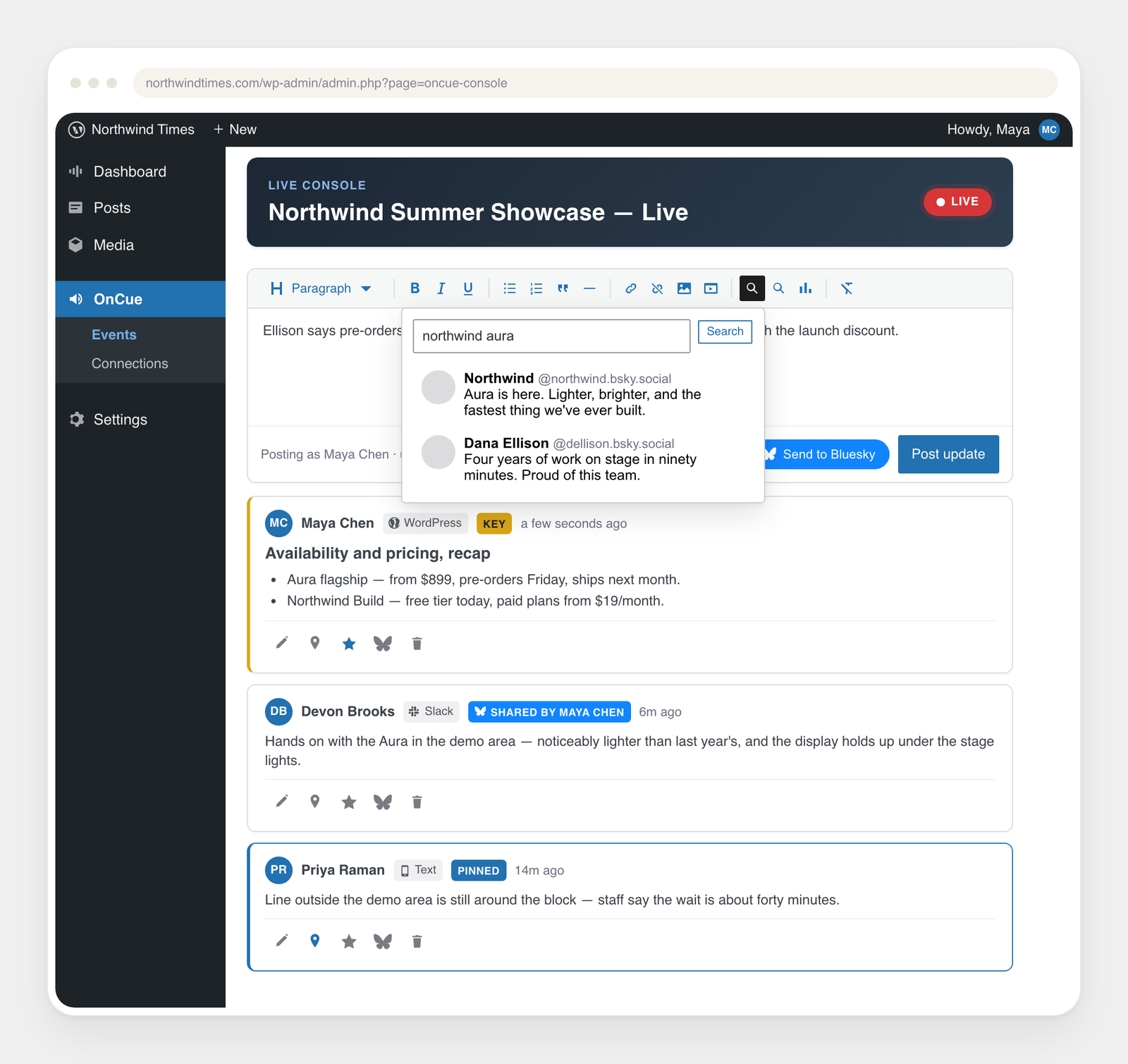
OnCue’s core is a real-time liveblog posted from the WordPress admin: create an
event, drop the OnCue block into a post, and post updates from the live console.
Everything beyond the core is an opt-in module, off by default:
- Slack ingestion — a dedicated channel becomes the liveblog feed.
- Telegram ingestion — a bot in a group (or DM) posts every message.
- More Coverage — a linked-headline list of the publication’s own articles for the event.
- Reader share cards — per-entry share row posting rich Open Graph cards.
- Moderation gate — per-event approval queue for contributors’ posts.
A disabled module registers no REST routes and schedules no jobs; the attack
surface is exactly the set of enabled features.
Security note on stored secrets
OnCue encrypts stored channel credentials (Slack/Telegram tokens and secrets)
at rest with libsodium, on by default. The encryption key never lives in the
database, so a database dump alone cannot decrypt them. Key source:
ONCUE_ENCRYPTION_KEYinwp-config.php(a 32+ char random string) if you
set one — preferred, because you can rotate it independently of WordPress; or- your existing WordPress security keys (AUTH_KEY etc.), which are already in
wp-config.php — so encryption works with no extra setup on any properly
installed site.
Only a site with neither (no real salts and no dedicated key) falls back to
plaintext, and the Connections screen flags that loudly.
What is not encrypted, by design: liveblog entries and other public content
(they are served to readers; encrypting them would break the live stream), and
non-secret identifiers like the house-account user ID or the public Slack
client ID. Encrypting the whole database or disk is the host’s responsibility
(encrypted volumes / MySQL TDE), not a plugin’s.
Changing the key source (e.g. rotating WordPress salts without setting a
dedicated key) makes previously stored credentials undecryptable — re-enter
them under Connections if that happens.
Typography
The reader inherits the host theme’s fonts throughout, including buttons and
form controls. The generated share-card image uses the site’s own typeface
too: OnCue resolves the theme’s body font (theme.json / Font Library) to a
local TTF/OTF file for GD. If the theme ships fonts only as woff2 (which GD
cannot read), upload a TTF of the same family to the Font Library, or point
the oncue_card_font filter at a font file; otherwise the card falls back to
GD’s built-in font.
External services
OnCue does not phone home and ships with every integration off. It contacts a
third-party service only when you enable that integration and provide your own
account or API key, and only to deliver the feature you turned on. Nothing is
sent to OnCue’s authors. The services, what triggers a request, and what data
leaves your site:
When you save a connection’s keys on the Connections screen, OnCue also makes
one small request to that service to confirm they work — a sign-in, an account
or model lookup, or, for Microsoft Teams and Google Chat webhooks (which can’t be
checked any other way), a one-line test message into the channel you connected.
These checks send your keys to the service they belong to and no liveblog
content.
- Slack (ingestion / relay) — only if you connect Slack. Sends liveblog entries
you relay out, and receives messages from a channel you designate. Terms:
https://slack.com/legal — Privacy:
https://slack.com/trust/privacy/privacy-policy - Telegram (ingestion / relay / contributor sign-in) — only if you connect a
Telegram bot. Sends relayed entries and receives messages from the bot’s chat.
Separately, once a bot is connected, OnCue loads Telegram’s official login
widget script (https://telegram.org/js/telegram-widget.js) inside wp-admin so
contributors can link their Telegram account in one click; Telegram receives
the request for that script and the sign-in it performs. That script is never
loaded on the public side of your site, and never loaded at all until you
connect a bot. Contributors who prefer not to use it can link by opening the
bot in the Telegram app instead. Terms: https://telegram.org/tos — Privacy:
https://telegram.org/privacy - Twilio (SMS relay) — only if you connect Twilio. Sends entry text to the
numbers you configure. Terms: https://www.twilio.com/en-us/legal/tos —
Privacy: https://www.twilio.com/en-us/legal/privacy - Facebook Messenger / Meta (ingestion) — only if you connect a Facebook Page.
Receives messages sent to your Page through the webhook you register with
Meta; when you save the Page token, OnCue looks up the Page’s name
(graph.facebook.com) to confirm it works. Terms:
https://www.facebook.com/legal/terms — Privacy:
https://www.facebook.com/privacy/policy - Microsoft Teams / Google Chat / Signal (relay) — only if you connect them.
Sends relayed entry text to the webhook/space you configure. Microsoft:
https://www.microsoft.com/servicesagreement — Google:
https://policies.google.com/terms — Signal: https://signal.org/legal/ - Bluesky / ATProto (curation / relay) — only if you connect a Bluesky account.
Searches public posts and, if enabled, mirrors marked entries out. Terms:
https://bsky.social/about/support/tos — Privacy:
https://bsky.social/about/support/privacy-policy - Threads / Meta (relay) — only if you connect a Threads account by pasting a
long-lived access token. Publishes the entries you mark into one thread on
that account (via graph.threads.net) and periodically refreshes the token.
Nothing is sent unless you enable Threads for an event and mark a post. Terms:
https://www.facebook.com/legal/terms — Privacy:
https://privacycenter.instagram.com/policy - YouTube Data API (coverage) — only if you add a YouTube API key. Sends search
queries for the event’s coverage. Terms: https://www.youtube.com/t/terms —
Google Privacy: https://policies.google.com/privacy - Google Analytics (Stats) — only if you enable the analytics bridge and/or add
a GA4 service-account key. Reader interactions flow through the Google tag
already on your pages (your tag’s consent tooling governs them); Stats reads
aggregate figures back from your own GA4 property. Terms:
https://marketingplatform.google.com/about/analytics/terms/us/ — Privacy:
https://policies.google.com/privacy - AI providers for the “Key highlights” summary (Crawler) — only if you choose a
provider and add your own key. The chosen event’s own updates and coverage are
sent to generate the summary. Anthropic:
https://www.anthropic.com/legal/consumer-terms /
https://www.anthropic.com/legal/privacy — OpenAI:
https://openai.com/policies/terms-of-use /
https://openai.com/policies/privacy-policy — Google Gemini:
https://ai.google.dev/gemini-api/terms /
https://policies.google.com/privacy — Self-hosted / OpenAI-compatible: governed
by the endpoint you point it at.
Development
The complete, unminified sources for the block editor and console bundles ship
in src/ inside this plugin, alongside the webpack.config.js used to build
them.
npm install && npm run buildbuilds the block editor and console bundles.npm run env:startboots a local WordPress with the plugin active (requires Docker).
Foto ekrani
Blloqe
Kjo shtojcë furnizon 1 bllok.
- OnCue Liveblog
Instalim
- Install and activate OnCue. A top-level OnCue menu appears in wp-admin.
- Go to OnCue New liveblog and create an event.
- Edit the post or page that should carry the liveblog and insert the
OnCue Liveblog block, choosing your event. The
[oncue]shortcode works in classic editors and page builders. - Post updates from OnCue Live console.
Everything beyond that is optional. To let reporters post from Slack or Telegram, go to OnCue Connections, enable the module, and follow the setup steps for that platform. No integration is enabled by default, and none is required to run a liveblog.
PBR
-
Do I need a Slack or Telegram account to use OnCue?
-
No. The core liveblog runs entirely inside WordPress. Slack and Telegram are
opt-in modules for teams who want reporters posting from the field. -
No. There is no account, no licence key, and no telemetry. OnCue contacts a
third-party service only when you connect that service yourself. See the
External services section below for the full list. -
Does the AI summary feature need an API key?
-
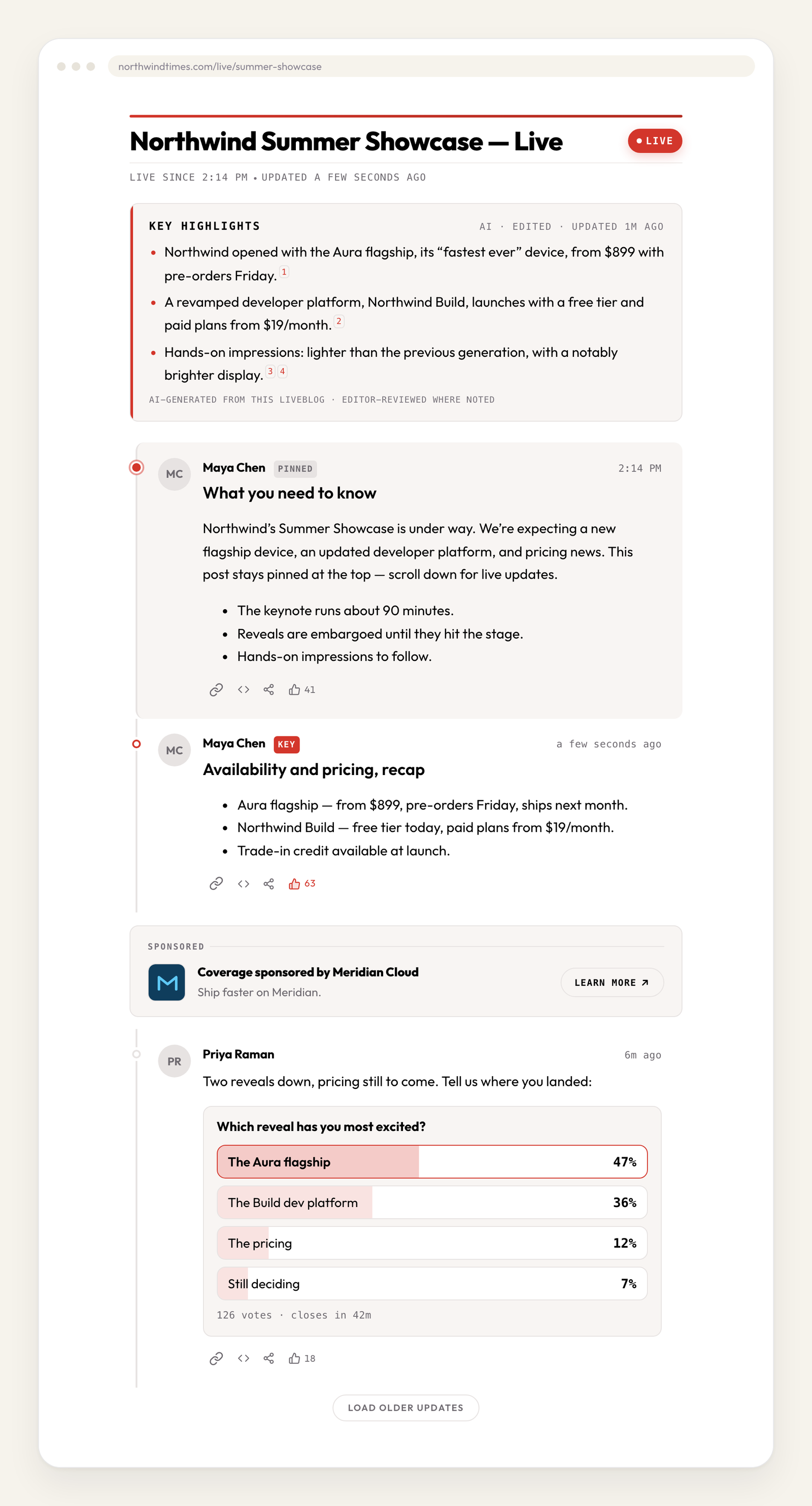
Yes, your own. The “Key highlights” module is bring-your-own-key and supports
Anthropic Claude, OpenAI, Google Gemini, and any OpenAI-compatible endpoint
including self-hosted ones. It is off until you choose a provider and add a
key. Summaries are grounded in the event’s own updates and coverage, and every
bullet carries a citation. -
Where are my API tokens stored?
-
Encrypted at rest with libsodium, using a key held outside the database. See
the security note below for details and for how to set a dedicated key. -
What happens to my liveblogs if I delete the plugin?
-
Deleting OnCue erases them. Every liveblog update, poll, contributor link and
connection setting lives in OnCue’s own database tables, and deleting a plugin
in WordPress drops those tables. This is not reversible without a database
backup.Your liveblog posts and uploaded images are deliberately kept — they are your
content and the public record — but with the updates gone they will be empty.Deactivating OnCue changes nothing: it stops the plugin running and leaves all
data in place. Only Delete removes it. If you are troubleshooting, or moving
the plugin between folders, deactivate rather than delete. -
What happens if the Wi-Fi drops while I’m posting?
-
Nothing is lost. A post written in the live console is held in the browser and
sent when the connection returns, marked “waiting for a connection” in your feed
until it goes. It then publishes at the time you wrote it, so it reads in order
with everything around it rather than jumping to the top of the story. The same
applies to messages sent from Slack, Telegram, and Messenger while a phone is
out of signal: they are dated from when they were sent. -
Can readers post or comment?
-
Not directly. Readers can react and vote in polls if you enable those modules.
Entries come only from your team, through wp-admin or a connected chat channel.
Shqyrtime
Për këtë shtojcë s’ka shqyrtime.
Kontribues & Zhvillues
“OnCue Liveblogging” është software me burim të hapur. Në këtë shtojcë kanë dhënë ndihmesë personat vijues.
Kontribues

Përkthejeni “OnCue Liveblogging” në gjuhën tuaj.
Ju intereson zhvillimi?
Shfletoni kodin, shkarkoni depon SVN, ose pajtohuni përmes RSS-je te regjistri i zhvillimeve.
Regjistër ndryshimesh
1.2.0
- A dropped connection now delays a post instead of losing it. Every update
written in the live console goes into an outbox and is sent from there, so a
post that can’t get through sits in your own feed marked “waiting for a
connection,” with the text intact, and goes out by itself when the network
returns. The queue is kept in the browser, so it survives a reload, a closed
laptop, or a crashed tab. A post the site itself refused (coverage ended, the
session expired) stops and waits for you, with Try now and Discard on it. - Late posts keep their place in the timeline. A post held up by a connectivity
gap publishes at the time it was written and reads in order with everything
around it, rather than jumping to the top. That covers the console’s outbox,
the wait while a photo uploads, and messages from Slack, Telegram, and
Messenger, which are now dated from the platform’s own send time. A stamp in
the future, or more than a day old, is ignored and the post takes the time it
arrived. Twilio SMS carries no send time, so a delayed text still dates from
when it reached the site. - A retry can no longer post twice. Each console post carries the id it was
written under, and the site returns the existing update for an id it has
already seen — the same protection chat messages get from their platform’s
message id. - A post belongs to whoever wrote it. Editing, deleting, pinning, starring, and
pushing a post to Bluesky or Threads are now permitted only to that post’s
author, or to an Editor or Administrator. Creating the event, or being
assigned to it, no longer carries authority over another contributor’s words.
This is a change for existing sites: an Author who could previously edit
anything in an event they created can now edit only their own posts. Refusals
say which rule applied instead of a flat “you cannot edit this entry,” and the
Slack emoji shortcut for sharing a post follows the same rule as the button. - Photos stay true to the file. A photo is turned the right way up on the way in
(Slack stripped the orientation tag, Telegram and the REST route did not), and
is scaled to a sensible size before WordPress sees it. If something on the
site’s upload path reshapes the pixels — an image optimization plugin is the
usual cause — OnCue puts the original back, and says so in the log when it
can’t. - Photos in the reader are never drawn out of shape, including against themes
whose own rules would stretch them, and the enlarged view now shows the photo
at its true proportions. A line under each photo says it can be tapped to
enlarge; it is left off images too small to be worth enlarging, and emoji are
no longer treated as photos.
1.1.0
- Connections are checked live when you save them. The Connections screen says
what OnCue reached (the Slack workspace, the Bluesky account, the AI model,
and so on) or gives the service’s own reason for refusing, and a connection
whose keys stop working reads “Needs attention” instead of “Connected.”
Microsoft Teams and Google Chat webhooks are confirmed with a one-line test
message. - Every connect, sign-in, and save now confirms itself inside the card or
prompt you used, instead of in a notice at the top of the page. Steps that
finish outside WordPress, such as inviting the bot to a private Slack channel
or tapping Start in the Telegram app, update the page on their own. - The approval gate is simpler and easier to follow. When it is on, posts from
anyone other than an Editor, an Administrator, or the event’s creator are
held, whatever channel they came from; the per-source setting is gone, so an
event that held only some sources now holds all of them. Held posts sit in
the live console feed at the time they were written, marked “Awaiting
approval,” with Approve and Reject on the post. Approved posts keep their
original time, and open reader pages still receive them. A rejected post
stays visible to its author until they dismiss it. In Slack, the hourglass
on a held message changes to a check mark or a cross once it is decided. - The prefix that keeps a chat message off the liveblog is now %%. Slack,
Teams, and Telegram open a command menu on a leading slash, which made the
old // awkward to type. - The More Coverage tag picker is searchable and reaches every tag on the site.
The old list stopped at 200 tags, and re-saving an event could drop a saved
tag past that point. It warns as soon as a broad tag is picked, and says so
when a saved tag has been deleted. - A link typed on the first line of a console post now becomes a preview card.
- Fixed connecting a Slack account from event setup or the live console, which
could fail with “the link you followed has expired.” Returning from Slack
while signed out of WordPress now asks you to sign in and completes the link.
1.0.9
- Compatible with WordPress 7.1. The liveblog block, the live console, and the
event setup screens were reviewed against 7.1’s always-iframed editor, its
persistent admin toolbar, and its refreshed editor components. - Pictures added from the live console stay a sensible size when they are
inserted moments after uploading. WordPress 7.1 prepares image sizes in the
browser, and a picture chosen before that finished could previously be placed
at its full original resolution.
1.0.8
- Share cards are generated only for posts that carry an image. A text-only post
is no longer rendered into a picture and saved to the Media Library. Its social
preview uses the event’s fallback share image instead, or no preview image at
all when the event has none set. - Generated share cards now leave with the post they belong to. Retracting a
post, deleting an event, or uninstalling the plugin clears its cards, and cards
created by earlier versions are swept out once on update. Images posted to a
liveblog, from WordPress or from a connected chat platform, are never touched.
1.0.7
- Security hardening throughout, in response to the WordPress.org review.
Request data is sanitized at the point it is read, and every dynamic value is
escaped on the line that prints it. - Telegram sign-in payloads are reduced to the fields Telegram actually sends,
each cleaned for its own field type, and the verified account ID must be a
positive integer before it is stored. A payload that fails either check is
rejected rather than trusted. - Analytics no longer reads a server value without sanitizing it first, and the
client IP is validated as a real IP address before it is hashed. It is still
never stored. - Event setup sanitizes the authors, tags, colors, module toggles, and
per-module settings it receives, instead of relying on a later pass. - Credentials for Slack, Telegram, Google Analytics, and the AI providers are
sanitized as they are read from the settings forms.
1.0.0
- First stable release, and OnCue’s first release on WordPress.org.
- Core liveblog: events, the OnCue Liveblog block and
[oncue]shortcode, and
the live console for posting, editing, pinning, and moderating updates. - Opt-in field posting from Slack and Telegram, with an optional per-event
approval queue for contributors’ posts. - Opt-in modules: More Coverage, reader share cards, reader reactions, polls,
per-event appearance, link preview cards, and outbound relay to Slack,
Telegram, Bluesky, Twilio SMS, Microsoft Teams, Google Chat, and Signal. - Built-in cookieless per-event analytics that require no third-party account.
- Bring-your-own-key “Key highlights” summaries with grounded, cited output,
supporting Anthropic Claude, OpenAI, Google Gemini, and OpenAI-compatible or
self-hosted endpoints. - Channel credentials encrypted at rest with libsodium, using a key held
outside the database. - Fully translatable, with a bundled POT file.
Releases below predate the WordPress.org listing and were distributed directly.
0.1.34
- Reader reactions: an opt-in, per-event thumbs-up on individual updates, with
no sign-in required and counts that refresh live. - Bluesky threads can now carry a per-event official hashtag, set in Event Setup.
0.1.33
- New Appearance tab: per-event accent, card background, border, and muted-text
colors with a readability check, plus contained or full-width layout. - Links pasted in the console, or shared from Slack or Telegram, now render as
preview cards with headline, description, image, and source. - Expanded Bluesky support.
0.1.25
- Built-in per-event analytics that need no Google account: reader numbers,
unique readers, shares, interactions, sources, devices, countries, and a live
“reading right now” count. - Collection is cookieless and stores no personal data. Visitor counts use a
daily-rotating fingerprint; IP addresses derive an approximate country and are
never stored. All data stays in your own database.
0.1.24
- First public release.