
Përshkrim
Kopjeruajtje Jetpack VaultPress është një shtojcë që ju jep kopjeruajtje me bazë renë dhe rikthime me një klikim, pa u dashur të instaloni shtojcën e plotë Jetpack. Shtojca WordPress për kopjeruajtje e vënë më tepër në provë, me mbi 270 milionë kopjeruajtje. Ruani çdo ndryshim dhe rikthehuni pa humbur kohë në linjë, me rikthime me një klikim.
Shënim: Që të përdorni këtë shtojcë, do t’ju duhet të kini një plan Jetpack me pagesë që përfshin Kopjeruajtje.
Rikthimi i sajtit tuaj s’ka qenë kurrë më i lehtë
Nëse fitoni para nga sajti juaj, ose harxhoni orë të tëra duke përsosur lëndë, ju duhen kopjeruajtje WordPress-i. Mbroni investimin tuaj duke e rikthyer sajtin tuaj në punë brenda pak sekondash. Shtojca jonë për kopjeruajtje të automatizuara WordPress është e fuqishme për profesionistët, por mjaftueshëm e kollajtë për fillestarët.
- Shtojcë e kollajtë për t’u përdorur, me rikthime me një klikim
- Rikthejeni nga kudo, me aplikacionin Jetpack për celular
- Rikthejeni, edhe në sajti juaj është jashtë funksionimi
- S’duhet zhvillues
- Asistenca më e mirë
Nëse shërbyesit e strehuesit tuaj dalin jashtë përdorimit, mendojmë ne për ju
Kopjeruajtjet nga streha ofrojnë ca mbrojtje, por mund të mos jetë e mjaftueshme për të ruajtur plotësisht të dhënat tuaja të çmuara. Ato kanë shpesh kufizime, bie fjala, vetëm kopjeruajtje një herë në ditë, depozitim “on-site” dhe ndërfaqe të ngathëta.
Shkyçni përparësinë e Kopjeruajtjeve VaultPress:
- Siguri e Pashoqe: Ruani aty për aty çdo ndryshim, në Renë ultra të sigurt Jetpack.
- Rimarrje e Menjëhershme: Riktheni sajtin tuaj, edhe kur streha juaj është jashtë funksionimi.
- Kopjeruajtje të ndërtuara posaçërisht për sajte WordPress dhe WooCommerce.
Qëndrueshmëri të cilës mund t’i zini besë
Kopjeruajtje Jetpack VaultPress ngrihet mbi infrastrukturën e klasit botëror të WordPress.com-it, ndaj mund të jeni të qetë se sajti juaj është i parrezik dhe mund të rikthehet në punë në çfarëdo çasti. Kopjeruajtjet nga shërbime strehimi shpesh hanë kohë të madhe dhe duam ekspertizë teknike për t’i rikthyer. Keni gjëra më me rëndësi për të bërë.
- Kopjeruani krejt kartelat, përfshi kopjeruajtje bazash të dhënash WordPress, kopjeruajtje kartelash temash dhe kopjeruajtje shtojcash
- Kopjeruajtje të krejt të dhënave mbi klientë dhe porosi WooCommerce
- Kopje identike të bëra në shërbyes të shumtë
- Kopjeruajtje jashtë sajti / në re, pra s’ka ngarkesë në shërbyesin tuaj
- Infrastrukturë globale shërbyesish
- Testuar për të garantuar se s’ka përplasje me shtojca apo shërbime strehimi të njohura
Kopjeruajtje të krijuara për WooCommerce-in
Kopjeruajtjet janë thelbësore për shitore eTregtie. Porosi të reja vijnë në çfarëdo çasti, ndaj ju duhet një plan për të mbajtur të parrezik të dhënat e porosive dhe klientëve tuaj. Kjo është arsyeja pse hartuam shtojcën Kopjeruajtje Jetpack VaultPress, posaçërisht me WooCommerce në mendje.
- Rikthejeni sajtin tuaj te cilado gjendje e kaluar, teksa ruhet aktuale krejt porositë dhe produktet
- Mbroni të dhënat e klientëve tuaj dhe jini në pajtim me GDPR-në
- Kopjeruajtje të përshtatura tabelash WooCommerce
Një must‑have për krijues sajtesh WordPress
Kurseni orë kohe të harxhuar në zhvillim dhe mirëmbajtje sajtesh, duke i rikthyer në çfarëdo pike të dikurshme. Një ndryshim i vetëm që ia vlen. Kopjeruajtjet aty për aty shkojnë tej një fotografimi, për t’ju dhënë fuqi dhe zhdërvjelltësi të plotë. Regjistri i veprimtarisë ju lejon të dini me saktësi se farë veprimi (dhe prej kujt) e nxori nga funksionimi sajtin, që të shfaqeni si profesionist për klientët tuaj.
- Kopjeruajtje të plota, inkrementale dhe diferenciale, aty për aty
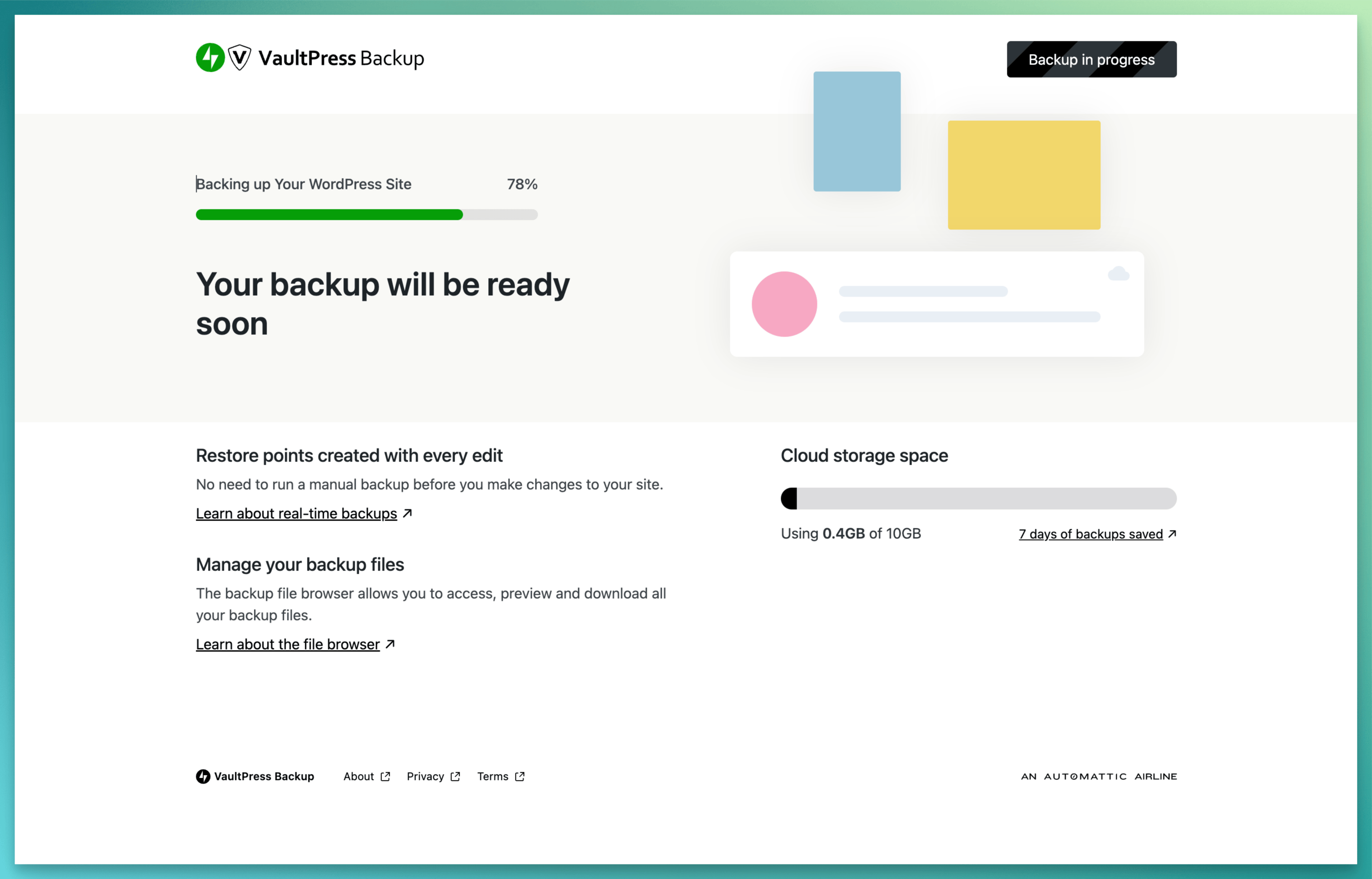
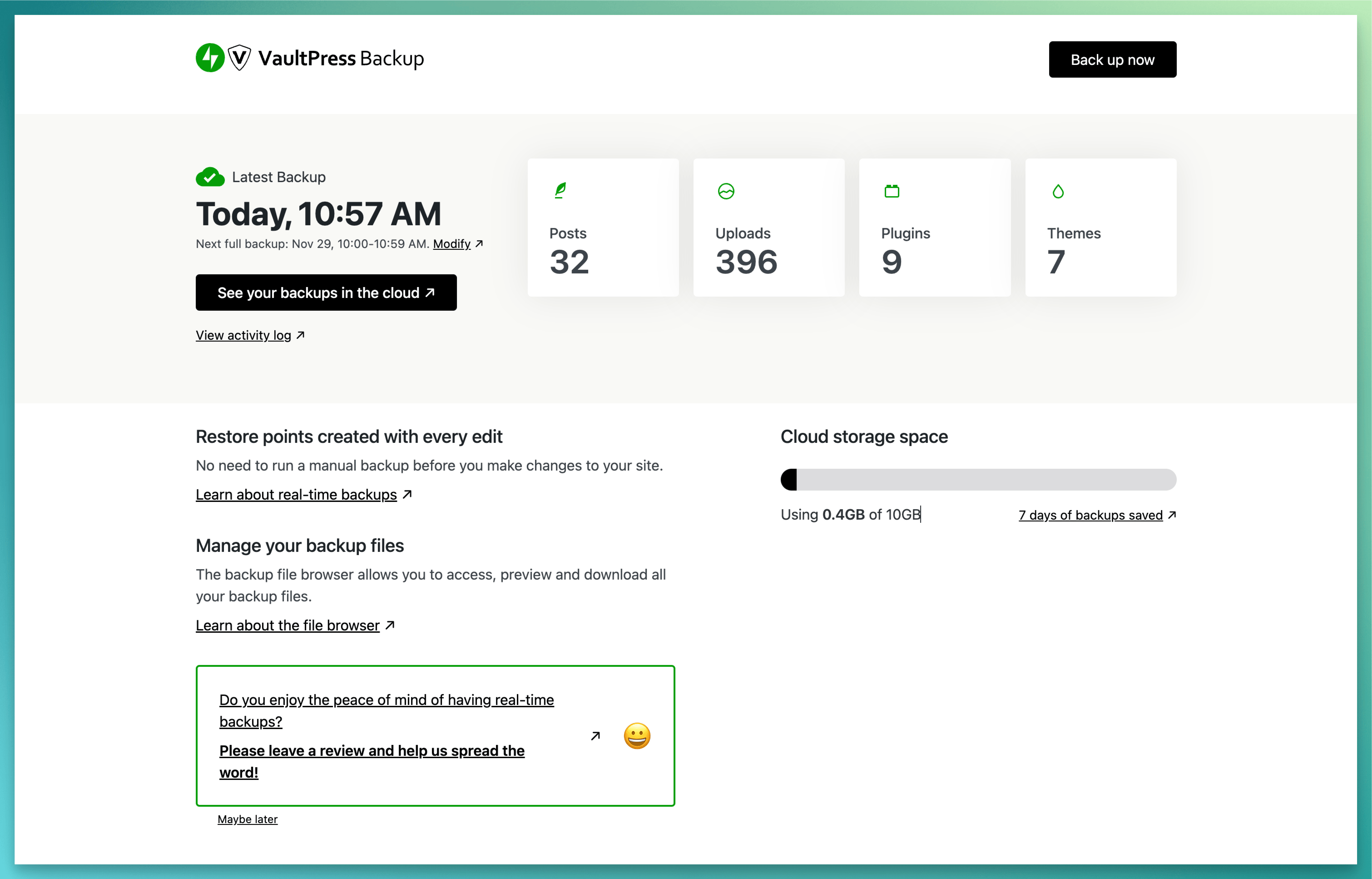
- Filloni një kopjeruajtje në çfarëdo kohe, me butonin Kopjeruaji tani
- Listë e plotë e krejt ndryshimeve të sajtit
- Rikthejeni shpejt e shpejt nga çfarëdo pike kohore
- Ndihuni i fuqishëm të eksperimentoni me pamjen dhe ndjesitë që jep sajti juaj
Asistencë Ekspertësh
Kemi një ekip global Inxhinierësh të Lumturisë gati për t’ju dhënë asistencë të pabesueshme. Bëni pyetjet tuaja te forumi i asistencës, ose lidhuni drejtpërdrejt me ne.
Fillojani
Instalimi është falas, i shpejtë dhe i kollajtë. Duhen vetëm pak minuta për të instaluar Kopjeruajtje Jetpack VaultPress.
Shënim: Që të përdorni këtë shtojcë, do t’ju duhet të kini një plan Jetpack me pagesë që përfshin Kopjeruajtje.
Foto ekrani
Instalim
Instalim i automatizuar
Mundësia e parë është për të instaluar Jetpack VaulPress Backup që nga zona Përgjegjës WP e instancës tuaj.
- Për t’i filluar, klikoni lidhjen Shtojca te anështylla majtas, mandej klikoni “Shtoni të Re”.
- Kërkoni për Kopjeruajtje VaultPress Jetpack. Te përfundimet e kërkimit do të gjendet versioni më i ri. Klikoni mbi butonin “Instaloje Që Tani”:
- Në vazhdim, klikoni butonin “Aktivizoje”. Pas aktivizimit, do t’ju shfaqet hapi për ujdisje të Kopjeruajtjeve Jetpack VaultPress.
Alternativa Dorazi
Përndryshe, instaloni Jetpack VaultPrees Backup përmes drejtorisë së shtojcave, ose ngarkojini kartelat dorazi te shërbyesi juaj dhe ndiqni udhëzimet që shfaqen në ekran.
Udhëzime të hollësishme rreth instalimit të Kopjeruajtjeve Jetpack VaultPress mund të gjenden te artikulli ynë Getting Started with the Jetpack VaultPress Backup Plugin.
PBR
-
Pse më duhen kopjeruajtjet?
-
Kopjeruajtjet e sajteve janë kyçe për një biznes apo prani në internet. Nëse bëni një gabim në ndryshim të diçkaje, doni të eksperimentoni me pamjen & ndjesitë që jep sajti juaj, ose ndodh dika dashakeqe me sajtin tuaj, pasja e kopjeruajtjeve kurson kohë dhe para në rikthimin e sajtit tuaj në funksionim, ose te një version i mëparshëm. Me Kopjeruajtje Jetpack VaultPress ju thjesht klikoni për ta rikthyer në një pikë të caktuar dikur dhe vazhdoni ditën tuaj.
-
Si ta rikthej sajtin tim përmes Kopjeruajtjeje VaultPress Jetpack?
-
Është e kollajtë të rikthehet në punë sajti juaj vetëm me pak klikime. Për më tepër hollësi, kontrolloni këtë video të shkurtër.
Për asistencë më të hollësishme, shihni artikullin e plotë të asistencës.
-
A s’ka tashmë strehuesi im kopjeruajtje?
-
Shumica e strehëve kanë njëfarëlloj kopjeruatje. Por shpesh ato janë jo të shpeshta dhe të zorshme për t’i rikthyer. Nëse sajti juaj del nga përdorimi, ju duhet hyrje te kopjeruajtjet tuaja. Nëse ato janë depozituar te platforma e strehimit për ju (ose në diskun tuaj!) dhe kartelat tuaja janë komprometuar, mund të jetë komprometuar edhe kopjeruajtja e bazës suaj të të dhënave.
Depozitimi jashtë sajti i kopjeruajtjes nga Jetpack-u ju lejon të riktheni një version të pastër të sajtit tuaj WordPress edhe nëse s’bëni dot hyrje në llogari. Kur bazoheni vetëm te kopjeruajtje të brendshme nga streha juaj, i vini tërë vezët në një shportë. Ja një shembull nga një klient Jetpack i asaj që mund të ndodhë. Pa një kopjeruajtje nga një palë e tretë, që i kopjon kartelat tuaja jashtë sajtit, sajti juaj mund të jetë në rrezik. Një lëvizje e gabuar nga ju, apo nga strehuesi i sajtit tuaj mund të komprometojë kartelat tuaja, ose t’i fshijë ato tërësisht.
-
Si të krijoj një kopjeruajtje WordPress për sajtin tim?
-
Nëse s’keni Kopjeruajtje, si pjesë të planit tuaj Jetpack, vizitoni Jetpack.com, që të mësoni më tepër dhe të blini.
Sapo ta blini shtojcën Kopjeruajtje Jetpack VaultPress, do të aktivizohet dhe do të plotësohet dhe kopjeruajtja e parë. Zor se ka ndonjë rregullim që duhet formësuar dhe s’ju duhet përvojë në programim.
Për plane me kopjeruajtje të përditshme, një kopjeruajtje e re do të ndodhë afërsisht 24 orë prej kopjeruajtjes së mëparshme. Kryhen vetvetiu – s’ka nevojë të krijoni një kohë specifike kur të xhirojnë kopjeruajtjet.
Për plane me kopjeruajtje të atypëratyshme, kopjeruajtja e re do të kryhet çdo herë që është bërë një ndryshim në tabela baze të dhënash të bazës së WordPress-it, në tabela baze të dhënash WooCommerce dhe çfarëdo ndryshimesh në kartela të lidhura me to. Krejt ndryshimet e tjera kopjeruhen një herë në ditë.
Një kopjeruajtje mund ta filloni edhe “sipas kërkesave”, duke klikuar mbi butonin Kopjeruaje tani.
Do ta kuptoni se kopjeruajtja juaj WordPress është krijuar, nëse shihni një akt Kopjeruajtje e plotë te regjistër veprimtarish.
-
S’e shihni kopjeruajtjen tuaj WordPress te regjistri i veprimtarisë?
-
Nëse vini se se kopjeruajtjet s’po ruhen ende, përditësoni kredencialet për sajtin tuaj. Kaloni te Jetpack Cloud dhe klikoni Rregullime. Duhet të shihni një formular që ju lejon të shtoni kredencialet e sajtit tuaj.
Nëse Jetpack-i s’mund të vendosë kontakt me sajtin tuaj dhe s’është e mundshme të krijohen kopjeruajtje, do të merrni një email pas dy provash të dështuara.
-
A mund të përdor Jetpack-un për kopjeruajtje të bazës sime të të dhënave WordPress?
-
Po, shtojca Kopjeruajtje Jetpack VaultPress kopjeruan bazën tuaj të të dhënave WordPress. Hollësisht, çfarëdo tabelash që fillojnë me parashtesën e tabelës tuaj WordPress dhe që ka gjithashtu një kyç unik, ose kyç parësor. Për më tepër hollësi, vizitoni faqen e asistencës.
-
A mund të përdor Jetpack-un për kopjeruajtje të kartelave të ima?
-
Po, shtojca Kopjeruajtje Jetpack VaultPress kopjeruan bazën tuaj të të dhënave WordPress. Kjo përfshin krejt kartelat te drejtoritë plugins, mu-plugins, themes dhe uploads. Për më tepër hollësi, vizitoni faqen e asistencës.
-
A mund të përdor Jetpack-un për kopjeruajtje të sajtit tim pa shtojca?
-
Po. Do të përjashtojmë çfarëdo drejtorie që përmban një kartelë të quajtur .donotbackup. Në u dashtë, mund t’i krijoni vetë këto kartela, për të penguar qëllimisht kopjeruajtjen e disa drejtorive. Nëse shtohet një drejtori e quajtur donotbackup, do të përjashtojmë gjithashtu krejt kartelat brenda asaj drejtorie. Për më tepër hollësi, vizitoni faqen e asistencës.
-
A mund të ruajë shtojca Kopjeruajtje Jetpack kartela në Google Drive apo Dropbox?
-
Kopjeruajtje Jetpack VaultPress s’mbulon ruajtje kartelash drejt e në Google Drive apo Dropbox. Ne japin depozitim falas në shërbyesit tanë, të ruajtur në mënyrë redundante në vendndodhje të shumta anembanë globit. Nëse doni të mbani një kopje, mund të shkarkoni kopjeruajtjen tuaj dhe ta ngarkoni te një sajt palë e tretë.
-
A mund t’i shkarkoj kopjeruajtjet e mia?
-
Po. Që të shkarkoni kopjeruajtjen tuaj, hapni regjistrin tuaj të veprimtarisë. Përdorni filtrat që të gjeni veprimtarinë, ose kopjeruajtjen që do të donit të përdorni, mandej klikoni mbi Veprime, dhe zgjidhni Shkarko kopjeruajtje. Për më tepër hollësi, vizitoni faqen e asistencës.
-
A mbulon instalime WordPress shumësajtësh Kopjeruajtja Jetpack VaultPress?
-
Jo, Kopjeruajtje Jetpack VaultPress aktualisht nuk mbulon instalime WordPress shumësajtëshe.
-
Does Jetpack VaultPress Backup support split site or split home URLs?
-
No, Jetpack VaultPress Backup does not currently support split site or split home URLs.
-
Ju duhet ndihmë?
Shqyrtime


Kontribues & Zhvillues
“Kopjeruajtje VaultPress Jetpack” është software me burim të hapur. Në këtë shtojcë kanë dhënë ndihmesë personat vijues.
Kontribues


“Kopjeruajtje VaultPress Jetpack” është përkthyer në 33 gjuhë. Faleminderit përkthyesve për ndihmesën e tyre.
Përkthejeni “Kopjeruajtje VaultPress Jetpack” në gjuhën tuaj.
Ju intereson zhvillimi?
Shfletoni kodin, shkarkoni depon SVN, ose pajtohuni përmes RSS-je te regjistri i zhvillimeve.
Regjistër ndryshimesh
4.0 – 2026-11-04
Added
- Activity Log: Link backups to that backup in the Backup dashboard, which now opens any backup from a link, not only those on the activity page it shows. Backups that finished with warnings can now be opened and restored there too.
- Connection: Add a Connected view to the Users page listing users with a linked WordPress.com account.
- Connection: Show connection errors on the Connectors card, and keep showing the connection owner when their account connection breaks.
- Connection: Surface SSL certificate verification failures reported by WordPress.com as a connection error notice.
- Connection: Transfer connection ownership to another administrator without leaving your site.
- Connection: Transfer connection ownership to another connected administrator from the Connectors page.
- My Jetpack: Add an Available filter to the Features list.
- My Jetpack: Add catalog-controlled Pro offers and preserve existing plan management.
- My Jetpack: Allow the Automattic for Agencies banner to be dismissed.
- My Jetpack: Recognize Jetpack Pro subscriptions and licenses.
- On sites hosted on WordPress.com, warn before restoring a backup with known security threats, and mark such backups in the backup list and the Activity Log. “Restore backup” in the Activity Log now opens the restore screen in wp-admin.
Changed
- Activity Log: Show the connection error notice only when a connection error has been recorded.
- Boost: Wait up to four minutes for slow speed tests in My Jetpack instead of timing out after two.
- Charts: follow the WordPress admin color scheme for chart series colors.
- Charts: update chart grid, axis and label colors immediately when the theme changes.
- Connection: Ask for confirmation before disconnecting your user account, and offer to transfer ownership first when you own the connection.
- Connection: Link the connection owner’s name on the Connectors card to their profile, and update the card without reloading the page when a non-owner disconnects their account.
- Connection: Show a clear message when connecting the site to WordPress.com from the Connectors card fails, instead of WordPress.com’s raw error text.
- Connection: Show every connection error in one notice, each with the account it affects, and link to Site Health when a firewall is blocking WordPress.com.
- Connection: Use one wording across My Jetpack and the Connectors screen for the consent notice shown before connecting, for Offline Mode, and for the ownership lock.
- Connection: When disconnecting the site from the Connectors card, list the plugins that will stop working and link to help.
- General: Update minimum WordPress version to 7.0.
- Link the failed download screen to a guide on how to fix it.
- My Jetpack: answer module switch clicks immediately, and explain what happened when a change fails.
- My Jetpack: Connect a WordPress.com account from feature cards that need one. Show feature states through switches or buttons instead of redundant Active or Inactive badges, and show host restrictions below descriptions. Leave features out of Available when their only action is an install you cannot make.
- My Jetpack: Keep focus on pricing tooltip icons when they open, announce their content to screen readers, and show a focus ring after clicking them.
- My Jetpack: Leave the recommendation to install or activate plugins included in a bundle plan out of the Jetpack menu notification badge.
- My Jetpack: Line up notices with the cards below them, and drop the grey background behind the Features grid and list buttons.
- My Jetpack: On the Features tab, keep a plugin’s switch busy until its card is up to date after a failed change, or after any change on sites that also run Jetpack.
- My Jetpack: Open supported Modules links in Features when Jetpack is active.
- My Jetpack: Open the Jetpack Connection details on the Connectors screen from the header’s Manage connection link.
- My Jetpack: Refresh Pro availability while preserving existing offers.
- My Jetpack: Restyle dashboard notices to match the WordPress design system.
- My Jetpack: Show a connection error on the Overview connection card while your account is still to be connected, instead of only asking you to connect it.
- My Jetpack: Show a Features tab in place of the Products tab.
- My Jetpack: Show Backup’s state from the site’s plan on its Features card instead of a switch, offering an upgrade, or a renewal for an expired plan.
- My Jetpack: Show product cards flat, without a drop shadow.
- My Jetpack: Show the avatar and connection status control in the header by default, with access to connection and plan details.
- My Jetpack: Show the dashboard in the new rounded admin page frame.
- My Jetpack: Show the Features page on sites in Offline Mode, without connecting to WordPress.com.
- My Jetpack: Show the Jetpack menu notification badge when a connection error is detected.
- My Jetpack: Show what Paid Stats actually adds — UTM tracking, device stats, and region & city locations — instead of commercial use.
- My Jetpack: Turn a module on once Install Jetpack or Activate Jetpack on its card finishes setup.
- Replace the dashboard with a redesigned one, where you can browse each backup’s files, restore or download a backup, and change when backups run and how long they are kept.
- Review request: Ask about backups instead of real-time backups, which was inaccurate on daily plans.
- Sidebar: sort Jetpack menu items alphabetically, pinning My Jetpack to the top and external links and Settings to the bottom.
- Tested up to WordPress 7.1.
- Update package dependencies.
- Use the design system progress bar for the backup, restore, download and storage meters.
Removed
- Updated PHP version requirements to PHP 7.4 or newer.
Fixed
- Activity Log: Fix the page overlapping the admin menu in right-to-left languages.
- Activity Log: honor the module setting, so the page can be turned off.
- Activity Log: Show an empty date picker on the free plan, instead of a date range it does not apply.
- Activity Log: Stop the frame from flashing while loading and when switching admin pages.
- Admin dashboards: Keep the page header and content in view when the wp-admin menu is taller than the window.
- Cache the promoted Backup subscription price so the screen shown to sites without a plan stops fetching it from WordPress.com on every load.
- Charts: draw labels at the design system’s font weight and size.
- Connection: Explain why connecting the site failed instead of showing a raw or generic error.
- Connection: Fix a stale connection error notice that could persist on healthy sites.
- Connection: Fix reconnecting your WordPress.com account so it no longer disconnects other users and clears the broken-connection notice on the first attempt.
- Connection: Hide connection error notices from users who cannot fix the connection.
- Connection: Let users without admin access reconnect their own broken account from the connection error notice.
- Connection: Report a broken connection on My Jetpack’s connection card instead of claiming everything looks good, and show a break only the connection owner can repair as a warning, not an error, to everyone else.
- Connection: Show connection owner names containing characters like & correctly.
- Connection: Stop showing a duplicate account notice when your WordPress.com email differs from your site email only in letter case.
- Connection: Stop Site Health from showing spurious connection failures — remove the redundant outbound HTTP/HTTPS checks, and no longer prompt a reconnect when the WordPress.com connection test is inconclusive.
- Connection: Stop users who cannot set up the site connection from becoming the connection owner when the owner’s connection is missing.
- Connection: Translate the Connectors card’s text on sites that don’t use English.
- Connection: Update wording for some connection error notices.
- Dashboard: Continue the wp-admin menu color behind the page frame on WordPress.com and third-party admin color schemes.
- Fix the backup overview ability reporting no storage usage, storage limit or backup time.
- Footer: Hide Products and Help links when My Jetpack is unavailable.
- JITM: Fix missing messages and a console error on sites without the Jetpack plugin active.
- Keep admin icons colored after the @wordpress/icons 16 update, which draws them as strokes.
- My Jetpack: always label the license activation link ‘Activate a license’. It previously read ‘Activate a new license’ on sites with a plan, even when no licenses had been activated.
- My Jetpack: Bring the first Features results into view after changing the filter or search while scrolled down.
- My Jetpack: Fix the layout of the connection screen for right-to-left languages.
- My Jetpack: Hide other plugins’ notices while the setup screen is open, and stop the full-screen layout breaking when another plugin adds an admin body class first.
- My Jetpack: Keep the Automattic for Agencies banner hidden after dismissing it and switching tabs.
- My Jetpack: Keep the Help tab’s cards inside their column on narrow screens.
- My Jetpack: keep the stats chart tooltip under sticky and fixed page elements.
- My Jetpack: Make the connection screen’s Connect button and footer links reachable on shorter screens.
- My Jetpack: Open pricing tooltips with the keyboard and dismiss them with Escape.
- My Jetpack: Point users who cannot connect the site at an administrator, instead of an onboarding screen they cannot complete.
- My Jetpack: Return to the tab you came from with the back link on product upgrade screens.
- My Jetpack: Show each notice once instead of twice.
- My Jetpack: Show the correct product status and use the active plugin copy when turning products on or off with both stable and Beta or development copies installed.
- My Jetpack: Show the highest-priority notice first when several are set at once.
- My Jetpack: Show the right product status as soon as fresher plan data is available, instead of reusing an earlier lookup.
- My Jetpack: Stop offering retired Security and Growth plans while preserving existing subscriptions.
- My Jetpack: Stop repeating the partner lookup request on every page load.
- My Jetpack: Stop reporting an error when switching VideoPress off while the Jetpack plugin is inactive.
- My Jetpack: Stop showing $0.00 for paid plans on recommendation cards when prices cannot be loaded.
- My Jetpack: Stop showing an empty account avatar on the Overview connection card on sites without a connection owner when nothing in use needs a user connection.
- My Jetpack: Stop the Stats dashboard from asking which plan you want again after Start for Free was already chosen.
- My Jetpack: stretch the tab content background to the full height of the page.
- Report a WordPress.com failure on the Backup plan check as an error instead of as a missing plan.
- Show a failure message when your backup status cannot be read, rather than the screen that says your first backup is on its way, and let the “Back up now” button recover when a backup could not be queued.
- Show a finished backup in the list without a page reload, even when WordPress.com is slow to list it, and add a “Backup complete” notice that stays until it is dismissed.
- Show storage usage and the plan limit the right way round when the interface is translated.
- Show that Backup is unavailable in Offline Mode instead of the dashboard, so a local copy of a site can’t act on the live site’s backups.
- Status: Detect a site served on any 127.0.0.0/8 loopback address, or on 0.0.0.0, as a local site.
- Stop a slow or failing WordPress.com from reading as a missing Backup plan.
- Stop the Get VaultPress Backup button from staying busy when setup fails.
- Underline the “Get in touch with us”, “Learn more” and “Modify” links, so they stand out from the sentence around them without relying on color.