

Përshkrim
Easy Map is a WordPress store locator and map plugin. Use it to add interactive maps, multiple location markers and a searchable store finder to any page. It’s built on Leaflet and uses OpenStreetMap with no API key. You can switch to Google Maps or CARTO at any time. Add maps with a shortcode or the Gutenberg block, show your shops, branches, dealers or offices with custom marker icons and rich popups, and draw delivery areas and routes on the map.
Who is Easy Map for?
- Retail chains and franchises that need a store locator or dealer locator
- Restaurants, clinics, banks, gyms and salons with several branches
- Agencies building location directories and “find us” pages
- WooCommerce shops that want to show where products are stocked (Pro)
- Anyone who wants a Google Maps alternative without API keys or billing
No API Key Required – OpenStreetMap & Leaflet
Easy Map uses OpenStreetMap tiles by default, so your map works as soon as you activate the plugin. You don’t need a Google Cloud account, an API key or billing. If you prefer another provider, choose Google Maps (roadmap) or OpenStreetMap CARTO in Settings and paste your key. All three providers are included in the free version.
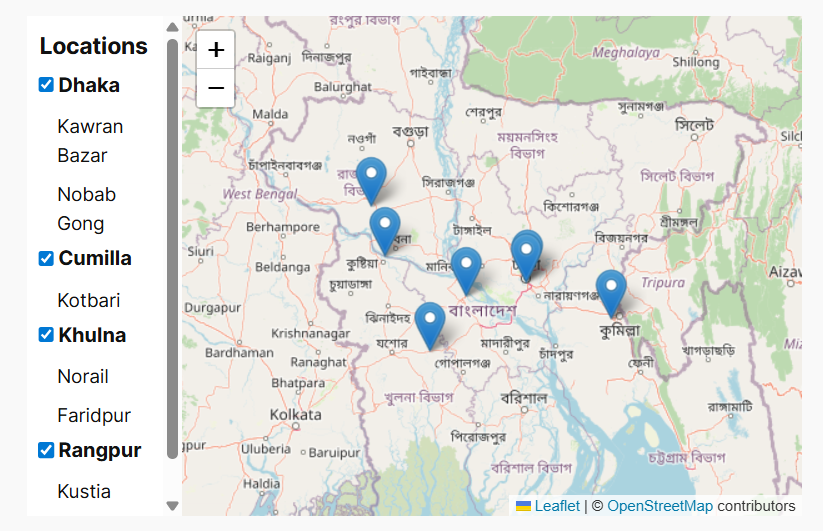
Store Locator for WordPress
Build a complete store finder in a few clicks and add it anywhere with [easy-map-store-locator id="…"].
- Live search by store name
- Category filter dropdown and a category sidebar with checkboxes
- Store cards that show the address, phone, email, opening hours and closing day
- Automatic Open Now / Closed badge, calculated from your hours in the site’s timezone
- Get Directions button that opens Google Maps route planning
- Click a store card to zoom the map to it and open its popup
- Pagination for long store lists (choose how many per page)
- Store Categories to group locations: create, search, sort and bulk delete
- Address search on the map (geo search) shown as a bar or a button
- Responsive layout that works on mobile and desktop
Interactive Maps & Multiple Markers
- Create any number of maps (3 in Free) and place each one with a short code like
[easy-map id="…"] - Show multiple locations on a single map
- 230+ built-in marker icons, including colored pins and themed icons
- Rich-text popups using the WordPress editor: bold text, links, lists, headings and images from the Media Library
- Open a popup automatically when the map loads
- Zoom control (with position), scroll-wheel zoom, full-screen mode and map height
- Settings page with a live map preview: click to set the center, zoom to set the default zoom level
- Inline shortcode attributes (
lat,lon,zoom,popup,tilelayerand more) for quick one-off maps
Draw on the Map – Polygons, Routes & Areas
Use the drawing tools to mark delivery zones, service areas, territories, routes and points of interest.
- Polygons, polylines, rectangles, circles, circle markers and markers
- Add a popup message to each shape
- Embed with
[easy-map-drawing id="…"]or draw a quick route with[easy-map-polyline]
Gutenberg Map Block
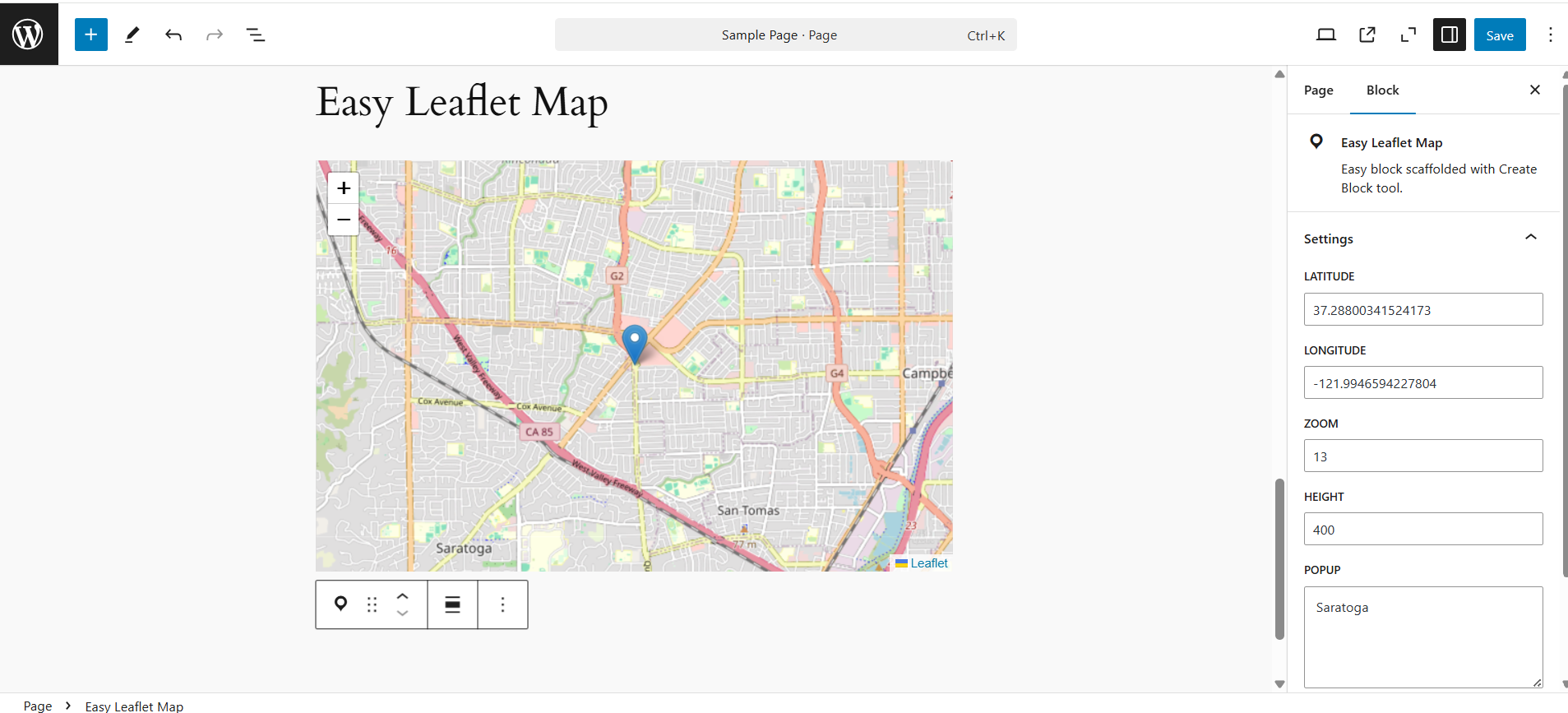
The Easy Leaflet Map block lets you place a map without a shortcode. It has a live preview in the editor: click to set the location, then adjust zoom, height, popup text and map controls from the sidebar. It also supports wide and full alignment.
Shortcodes
[easy-map]– the default map, or a saved map withid[easy-map-marker id="…"]– add a saved location marker to the map above it[easy-map-drawing id="…"]– add saved shapes to the map[easy-map-polyline latlons="lat,lon - lat,lon"]– draw a line[easy-map-store-locator id="…"]– full store locator
The Shortcode Sample page in the admin shows examples you can copy.
Fast & Developer Friendly
- Location and store data is cached, and there’s a one-click Clear Cache button
- REST API (
easy-map/v1) plus action and filter hooks for extending the plugin - Filters to rename store locator labels (search placeholder, “All Categories”, title)
- Translation ready (
easy-maptext domain, .pot file included)
Easy Map Pro – Advanced Store Locator Features
Upgrade to Easy Map Pro to remove all limits and get:
- Unlimited maps, locations, drawings, store locators and categories
- Near Me search: visitor geolocation, a radius slider (km/mi), a radius circle on the map and the distance to each store
- Marker clustering for maps with many locations
- 4 store locator layouts: Sidebar + Map, Card Grid, Split Horizontal, List + Map
- WooCommerce product filter: link products to stores and let customers find where a product is available
- Custom marker image upload for the whole site, for each location or for each category
- Category defaults: give a category a default image and marker, and apply them to every store in it with one click
- Store images, Facebook/Instagram/website links and a custom “More Info” button
- 4 popup templates: Image + Contact, Minimal, Opening Hours, Social Links
- Share a store: Facebook, X or copy link, with Open Graph tags so the link shows a rich preview
- Sort stores and categories in your preferred order
- CSV import & export for locations and store categories (comma, semicolon or tab delimiters)
- Edit and delete shapes you’ve already drawn
Support
Need help using Easy Map? You can check the documentation for setup guides, shortcode examples, and feature instructions. For plugin issues, questions, or feature requests, please use
the WordPress.org support forum or email at wpeasysoft.official@gmail.com or contact the WP Easy Soft Support team
JS Libraries Used
The Third party libraries, non-compiled version of JavaScript and/or CSS-related documentation and source code can be found at the following links:
- assets/js/leaflet/leaflet.js: Leaflet an open-source JavaScript library for mobile-friendly interactive map. Documentation, Source Code
- assets/js/leaflet/Leaflet.draw.js: Leaflet.draw, a plugin that adds drawing and editing tools to Leaflet powered maps. Source Code
- assets/js/leaflet/GoogleMutant.js: Leaflet plugin to display Google maps baselayers using DOM mutation observers. Source Code
- assets/js/leaflet/leaflet-bing-layer.js: Bing Maps Layer for Leaflet. Source Code
Foto ekrani



Blloqe
Kjo shtojcë furnizon 1 bllok.
- Easy Leaflet Map Easy block scaffolded with Create Block tool.
Instalim
Getting started with Easy Map is simple:
- Install and activate Easy Map from your WordPress dashboard.
- Create your first map from the Easy Map settings.
- Add locations, markers, drawings, or store locator details.
- Copy the generated shortcode.
- Paste the shortcode into any page, post, or supported widget area. You can also use the Gutenberg block to add maps directly from the WordPress block editor
PBR
-
Do I need a Google Maps API key?
-
No. Easy Map uses OpenStreetMap by default, which needs no key or billing. You only need a key if you choose Google Maps or CARTO.
-
How do I add a store locator to WordPress?
-
- Create Store Categories.
- Add your Locations and assign each one a category.
- Create a Store Locator and pick the categories to show.
- Paste
[easy-map-store-locator id="…"]into any page.
-
Can I show multiple locations on one map?
-
Yes. When you edit a map, select as many locations as you like and they all appear on that map, each with its own marker and popup.
-
Can I use custom marker icons?
-
Yes. Choose from more than 230 built-in icons. Uploading your own marker image is a Pro feature.
-
Does it show whether a store is open now?
-
Yes. Enter the opening hours and closing day for each location, and the store locator shows an Open Now / Closed badge based on your site’s timezone.
-
Can visitors find the nearest store?
-
Yes, with Pro. Near Me search uses the visitor’s location and a radius slider, and lists the stores within that distance.
-
Does it work with Gutenberg and page builders?
-
Yes. Use the Easy Leaflet Map block in Gutenberg. In Elementor, Divi or any other builder, paste the shortcode into a shortcode or text widget.
-
Can I draw delivery zones or service areas?
-
Yes. Draw polygons, rectangles, circles and routes, add a popup to each, and embed them with a shortcode.
-
Is it compatible with WooCommerce?
-
Yes. Pro lets you link WooCommerce products to stores and adds a “Filter by Product” option to the store locator.
-
Can I import my stores from a spreadsheet?
-
Yes, with Pro. Import and export locations and store categories as CSV files.
-
What are the limits of the free version?
-
The free version allows 3 maps, 10 locations, 5 drawings, 2 store locators and 5 store categories. Pro removes all of these limits.
Shqyrtime


Kontribues & Zhvillues
“Easy Map – Store Locator, OpenStreetMap & Google Maps” është software me burim të hapur. Në këtë shtojcë kanë dhënë ndihmesë personat vijues.
Kontribues
Përkthejeni “Easy Map – Store Locator, OpenStreetMap & Google Maps” në gjuhën tuaj.
Ju intereson zhvillimi?
Shfletoni kodin, shkarkoni depon SVN, ose pajtohuni përmes RSS-je te regjistri i zhvillimeve.
Regjistër ndryshimesh
2.0.1 (2026-10-05)
- Added: Store Category page rebuilt with the new React + REST API admin interface
- Fixed: Store Category “Add New” silently failing to save
- Fixed: Bold text in map popups now renders correctly on the frontend regardless of theme font weight
- Updated: Store Category Add/Edit screen redesigned with side-by-side cards and inline marker icon preview
- Updated: Saving/updating a Store Category now returns to the list automatically
- Updated: Loading spinners replaced with a centered, properly sized loader across admin screens
- Updated: “Get Pro” links now shown as a consistent highlighted badge on Settings and Store Category pages
2.0.0 (2026-10-03)
- Added: Settings page rebuilt with a new React + REST API admin interface
- Added: Automatic redirect to the Settings page right after activating the plugin
- Added: Pro — custom marker image upload foundation
- Fixed: Settings page Popup field now uses the full WordPress rich text editor (Visual/Code tabs, Add Media, formatting toolbar) instead of a plain text box
- Fixed: Reactivating the plugin no longer resets your saved Settings back to the defaults
- Fixed: Settings preview map not showing the saved custom marker image
- Fixed: Manage Map/Location list tables hidden by a conflicting third-party plugin style
- Updated: Solid-color markers now listed first in the marker icon picker
- Updated: Settings save confirmation now shown as a toast notification
1.9.5 (2026-09-27)
- Fixed: “Click to copy” shortcode on the settings page not working on sites without a secure (HTTPS/localhost) context
1.9.4 (2026-09-26)
- Fixed: Location cache not invalidated for the previous category when a location’s category is changed
- Fixed: Store Locator cache (Pro) not invalidated after edits
- Updated: Cache clearing now works correctly on sites using a persistent external object cache (Redis/Memcached)
- Updated: Cache is now purged on plugin uninstall
1.9.3 (2026-09-19)
- Added: Limitation on maximum entited allowed of Map,Store Locator,Drawing and Store Category..
- Updated: Upgrade to Pro page UI
- Updated: Store locator pagination on center
- Fixed: Carto Map API KEY REQUIRED issue
1.9.2 (2026-09-12)
- Added: Display locations and drawings dropdown on Add/Edit Map page
- Fixed: Map click showing default blue marker on Edit Location page
- Fixed: Marker not showing on admin Add Store Locator page
- Fixed: Map Shortcode issue
1.9.1 (2026-09-06)
- Added: Marker Icon selection is now free — choose from 230+ bundled icons for your map and each location/store (Add/Edit Map, Add/Edit Location, and Settings pages)
1.9.0 (2026-09-03)
- Added: Filter by title and category on store/location page
- Added: Alert message for bulk delete
- Fixed: Geo search issue
- Fixed: Get PRo and Support link issue
1.8.27 (2026-08-30)
- Updated: Code Refactor
1.8.26 (2026-08-22)
- Tweak: WordPress 7.1 compatibility checked
1.8.25 (2026-08-16)
- Added: Store Open/Close badge
1.8.24 (2026-08-05)
- Added: Show Directions option
1.8.23 (2026-07-29)
- Added: Geo Search option
1.8.22 (2026-07-15)
- Updated: Store locator shortcode functionality
1.8.21 (2026-07-14)
- Fixed: Page redirect issue
1.8.20 (2026-07-10)
- Added: Store locatore pagination control
1.8.19 (2026-07-05)
- Updated: Plugin description with promotional video
1.8.18 (2026-06-30)
- Updated: Plugin redirect logic
1.8.17 (2026-06-20)
- Updated: Plugin submenu
1.8.16 (2026-06-09)
- Updated: Store locator admin UI
- Updated: Store locator frontend UI
1.8.15 (2026-06-06)
- Updated: Store locator admin UI
- Updated: Location/Store admin UI
1.8.14 (2026-06-02)
- Updated: Plugin Description
1.8.13 (2026-05-21)
- Updated: Store locator frontend UI
- Updated: Map admin page UI
- Added: Marker Icon Popup
- Fixed: Map frontend UI issue
1.8.12 (2026-05-17)
- Added: Plugin deactive feedback
1.8.11 (2026-05-15)
- Updated: Plugin UI and Description
1.8.10 (2026-03-15)
- Updated: Plugin Description
1.8.9 (2026-03-10)
- Fixed: Samole page shortcode issue
- Fixed: Security vulnerability issue
1.8.8 (2026-03-05)
- Updated: Drawing features code refactor
1.8.7 (2026-03-01)
- Fixed: Location/Store data insert issue
1.8.6 (2026-01-18)
- Fixed: Frontend Store locatore icon issue
1.8.5 (2026-01-11)
- Updated: Admin Map Page UI
- Updated: Admin Store Page UI
1.8.4 (2025-12-16)
- Updated: Admin Map Page UI
- Updated: Code Refactor
1.8.3 (2025-12-02)
- Added: Location/Store addition information
- Updated: Location/Store Page UI
- Tweak: WordPress 6.9 compatibility checked
1.8.2 (2025-11-17)
- Updated: Map Page UI
- Updated: Location/Store Page UI
1.8.1 (2025-11-03)
- Updated: Location/Store Page UI
- Updated: Store Locator Page UI
1.8.0 (2025-10-24)
- Added: Store Locator Page
- Added: Store Locator Category Page
- Update: Loation/Store Page
1.7.2 (2025-09-23)
- Updated: Location page Add/Edit UI
1.7.1 (2025-09-17)
- Updated: Map page Add/Edit UI
1.7.0 (2025-09-13)
- Added: Pro version price page
- Fixed: PHP Warning error
1.6.16 (2025-08-30)
- Added: Accessible name alt for marker
1.6.15 (2025-06-28)
- Added: OpenStreetMap Carto tile layer
- Fixed: Map tile layer issue for Shortcode
1.6.14 (2025-06-15)
- Updated: Map block editor
1.6.13 (2025-06-01)
- Added: Rectangle draw option
- Added: Circle draw option
- Added: Circle Marker draw option
1.6.12 (2025-05-25)
- Added: Polygon Popup message option
1.6.11 (2025-05-11)
- Updated: Language pot file
1.6.10 (2025-04-19)
- Added: WordPress Hook Implementation
- Tweak: WordPress 6.8 compatibility checked
1.6.9 (2025-04-14)
- Added: Dynamic map tile layer for Block editor
1.6.8 (2025-04-12)
- Added: Block editor Zoom Control option
- Added: Block editor Zoom Control Position option
- Added: Block editor Scroll Wheel Zoom option
- Added: Block editor Full Screen control option
1.6.7 (2025-04-06)
- Updated: Gutenberg block editor
- Updated: Map Shortcode grid order
- Added : Map Title mandatory
1.6.6 (2025-03-02)
- Fixed: Deleted Map ID Frontend render issue
1.6.5 (2025-02-22)
- Fixed: Drawing Bulk delete issue
- Fixed: PHP fatal and warning error issue
1.6.4 (2025-02-16)
- Added: Admin end drawing marker option
1.6.3 (2025-02-09)
- Fixed: Admin end drawing location render issue
- Fixed: Front end marker popup view issue
1.6.2 (2024-11-28)
- Updated: Plugin Information
1.6.1 (2024-11-26)
- Fixed: After update data reload issue
- Fixed: Plugin Check (PCP) issue
- Fixed: Sample map Shortcode height issue
- Fixed: Location marker issue on frontend
1.6.0 (2024-11-23)
- Added: Drawing manage page
- Added: Drawing add page
- Added: Drawing view page
- Added: Map height option
1.5.0 (2024-11-16)
- Added: Location manage page
- Added: Location add page
- Added: Location edit page
- Tweak: WordPress 6.7 compatibility checked
1.4.4 (2024-11-10)
- Added: HTML Popup
- Added: Open Popup settings
1.4.3 (2024-11-09)
- Added: Manage map bulk delete
- Updated: Menu order list
1.4.2 (2024-08-15)
- Added: Edit Dynamic Shortcode page
1.4.1 (2024-07-27)
- Added: Add Dynamic Shortcode page
- Added: Manage Dynamic Shortcode page
- Added: Dynamic Shortcode delete
- Added: Dynamic Shortcode copy
1.4.0 (2024-05-22)
- Added: Custom Map Gutenberg Block
- Tweak: WordPress 6.5 compatibility checked
1.3.7 (2024-02-04)
- Added: Default Marker shortcode
1.3.6 (2024-01-21)
- Added: Polyline Shortcode
- Fixed: Fullscreen icon issue
1.3.5 (2024-01-13)
- Added: Fullscreen Control Setting
1.3.4 (2023-12-31)
- Added: Zoom Control Position Setting
- Updated: Map view responsive
1.3.3 (2023-12-25)
- Added: Zoom Control Setting
- Added: Scroll Wheel Zoom Setting
1.3.2 (2023-12-18)
- Added: Popup funtionality for Marker Shortcode.
1.3.1 (2023-12-15)
- Added: Shortcode for Marker.
- Fixed: Bug Issue
1.3.0 (2023-12-02)
- Updated: Code Refactor
- Fixed: Bug Issue
1.2.6 (2023-11-26)
- Updated: Settings page map zoom level auto update.
1.2.5 (2023-11-19)
- Updated: Settings page onclick map lat-lon auto update.
1.2.4 (2023-11-17)
- Added: Shortcode Sample Page.
1.2.3 (2023-11-13)
- Fixed: Settings page bug issue
1.2.2 (2023-11-11)
- Updated: Multiple Map added on single page.
- Tweak: WordPress 6.4 compatibility checked
1.2.1 (2023-11-04)
- Updated: Code Refactor.
1.2.0 (2023-11-04)
- Added: Google Map.
1.1.0 (2023-10-28)
- Added: Bing Map.
1.0.2 (2023-10-20)
- Updated: Map Shortcode.
- Tweak: WordPress 6.3.2 compatibility checked
1.0.2 (2023-10-20)
- Updated: Map Shortcode.
- Tweak: WordPress 6.3.2 compatibility checked
1.0.1 (2023-10-15)
- Updated: Map Shortcode.
1.0.0 (2023-10-14)
- Added: First Release.