
Përshkrim
This plugin does only one thing: it allows you to prerender specific pages / posts on your WordPress site.
The prerendering feature which will make your website faster, as the browser will fetch and render the entire next page on the background.
Therefore, if you know which page your visitors are most likely to visit next, you can preload it. The User Experience (UX) will therefore be slightly better.
Getting Started
If you want more in-depth explanations, we’ve written a mini-tutorial on our blog: Behavior Flow: Speed Up Your WordPress Site
- Firstly, you need to determine how your users traverse and interact with your site. Simply sign in to Google Analytics and go to the Behavior Flow page (Analytics Help).
- Login to your WordPress site, install and activate this plugin.
- Edit the page where most visitors land (most likely your homepage).
- Scroll down to the meta box “Page to Prerender” and select the next page from the dropdown menu (the one that most visitors will browse next).
- Hit the “Update” button!
Cons
Enabling page prerendering will likely increase server load. You should figure out a good balance between prerendering and increasing the server load. Visitors that land on your site will request the entire next page even if they do not visit it…
Foto ekrani
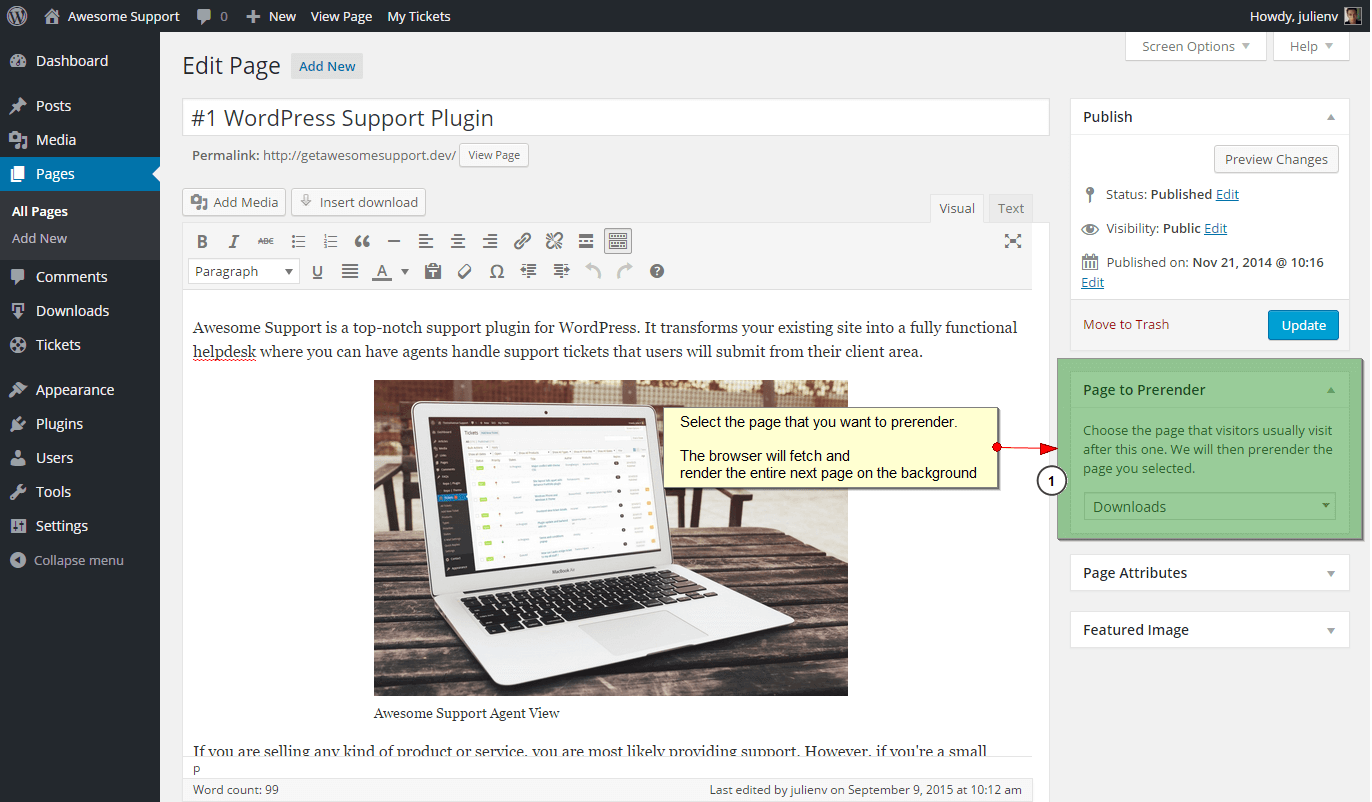

Instalim
Using The WordPress Dashboard
- Navigate to the ‘Add New’ in the plugins dashboard
- Search for ‘Behavior Flow’
- Click ‘Install Now’
- Activate the plugin on the Plugin dashboard
Uploading in WordPress Dashboard
- Download
behavior-flow.zipfrom this page - Navigate to the ‘Add New’ in the plugins dashboard
- Navigate to the ‘Upload’ area
- Select
behavior-flow.zipfrom your computer - Click ‘Install Now’
- Activate the plugin in the Plugin dashboard
Using FTP
- Download
behavior-flow.zipfrom this page - Extract the
behavior-flowdirectory to your computer - Upload the
behavior-flowdirectory to the/wp-content/plugins/directory - Activate the plugin in the Plugin dashboard
PBR
None yet.
Shqyrtime
Për këtë shtojcë s’ka shqyrtime.
Kontribues & Zhvillues
“Behavior Flow” është software me burim të hapur. Në këtë shtojcë kanë dhënë ndihmesë personat vijues.
Kontribues

Përkthejeni “Behavior Flow” në gjuhën tuaj.
Ju intereson zhvillimi?
Shfletoni kodin, shkarkoni depon SVN, ose pajtohuni përmes RSS-je te regjistri i zhvillimeve.
Regjistër ndryshimesh
1.0
- First stable release