
Përshkrim
Boxy WooCommerce Custom Redirect After Checkout lets you send customers to any page you choose after a successful WooCommerce order — instead of the default order confirmation page.
Whether you want to show a custom thank you page, promote an upsell offer, collect survey responses, or direct customers to a tutorial, this plugin makes it simple.
Free Features
- Redirect all customers to a single custom URL after checkout
- Optional redirect delay (0–10 seconds)
- Countdown timer displayed on screen: “You will be redirected in 5… 4… 3… 2… 1…”
- Works with classic checkout and WooCommerce block checkout
- Clean modern admin settings page (Boxy Redirect menu)
- Redirect to full URLs or relative paths (/thank-you)
- Lightweight — no impact on store performance
- Fully translatable (i18n ready)
- Compatible with all major caching plugins
Why Redirect After Checkout?
The default WooCommerce thank you page is plain and does nothing for your business. A custom redirect lets you:
- Show a branded thank you page that matches your store design
- Promote an upsell or cross-sell offer while the customer is in buying mode
- Collect customer feedback with a post-purchase survey
- Direct customers to a tutorial or onboarding page
- Track conversions with Google Analytics or Facebook Pixel
- Show payment instructions for bank transfer orders
Upgrade to Pro — Powerful Rules Engine
The free version redirects all customers to the same URL. Pro unlocks a full rules engine so you can redirect different customers to different pages based on what they ordered, who they are, and how they paid.
Rules work like this:
- You create multiple redirect rules
- Each rule has one or more conditions
- Rules are checked top-to-bottom by priority
- The first matching rule fires — the rest are skipped
- If no rule matches, your free fallback URL is used
Every rule shows a plain-English live preview:
“When a customer completes checkout and their billing country is Germany, they will be immediately redirected to /de/danke. Customers from other countries will skip this rule.”
Test before going live with the Customer Journey Simulator:
Enter a hypothetical customer profile and see exactly which rule would fire and why — before a single real customer is affected.
Starter Plan — Rules Engine with 4 Conditions
Build redirect rules using these conditions:
-
Specific Product Purchased — redirect based on which products are in the order
Example: Customer buys a T-Shirt — redirect to /tshirt-care-guide -
Product Category — redirect based on product category
Example: Customer buys from Electronics — redirect to /warranty-registration -
Order Total — redirect based on amount spent (greater than, less than, between)
Example: Order total over $200 — redirect to /vip-club -
User Role — redirect wholesale, retail, and member customers differently
Example: Wholesale customer checks out — redirect to /wholesale-thank-you
Each rule supports Match ALL (every condition must be true) or Match ANY (at least one condition must be true). Rules are drag-and-drop sortable and can be individually enabled or disabled.
Pro Plan — All 8 Conditions + Order Data in URL
Everything in Starter plus:
-
Coupon Code Used — redirect customers based on the coupon they used
Example: Customer uses coupon FACEBOOK20 — redirect to /facebook-special-offer
Use case: Track ROI from marketing campaigns -
First Time Buyer — detect a customer’s very first order and treat them differently
Example: First order — redirect to /welcome-new-customer with onboarding guide
Returning customers automatically skip this rule -
Payment Method — redirect based on how the customer paid
Example: Bank transfer — redirect to /payment-instructions with account details -
Customer Country — redirect based on billing country
Example: Germany — /de/danke, France — /fr/merci, everyone else — /thank-you -
Pass Order Data in URL — append real order details to your redirect URL using variables:
{order_id} {first_name} {last_name} {email} {order_total} {payment_method} {coupon_code}
Example: /thanks?name={first_name}&order={order_id} becomes /thanks?name=John&order=1234 -
Custom Delay Per Rule — set a different countdown timer for each rule (0–30 seconds)
Agency Plan — Everything + A/B Testing + Analytics
Everything in Pro plus:
-
A/B Testing — split traffic between multiple redirect URLs with percentage control
Example: 50% of customers go to Page A, 50% go to Page B — find out which converts better -
Analytics Dashboard — see every redirect that fired, broken down by rule
Includes date range filtering (today, 7 days, 30 days, custom) and A/B test performance comparison -
Export to CSV — download your full redirect history
-
Unlimited Sites — use on as many WordPress installs as you need
Full Customer Journey Example
Rules set up by admin:
- Priority 1: Coupon = VIPCODE — redirect to /vip-thank-you
- Priority 2: Country = Germany — redirect to /de/danke
- Priority 3: Order Total over $200 — redirect to /big-spender-offer
Customer checks out with coupon SAVE10 from Germany spending $250:
- Rule 1 checked — coupon is SAVE10 not VIPCODE — skipped
- Rule 2 checked — billing country is Germany — matched!
- Customer is redirected to /de/danke
- Rules 3 and beyond are never checked
Is This Plugin GDPR Compliant?
Yes. The free version does not collect, store, or transmit any personal data. The Pro analytics feature stores only the order ID and redirect URL in your own database — no data is ever sent to third parties.
Works With Everything
- WooCommerce classic checkout
- WooCommerce block checkout
- All major page builders (Elementor, Divi, Beaver Builder)
- All major caching plugins (WP Rocket, W3 Total Cache, LiteSpeed Cache)
- Multisite installations
Foto ekrani
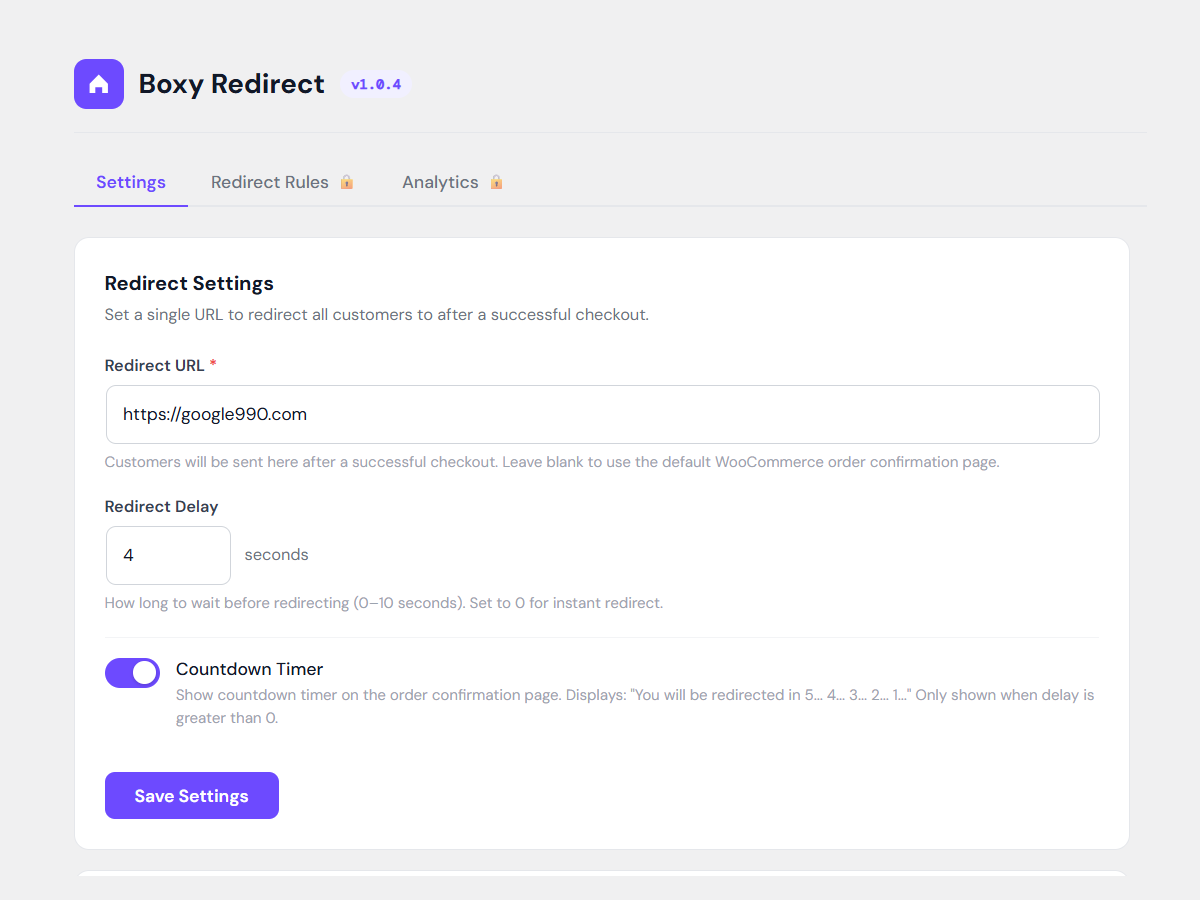
Settings page — set your redirect URL, delay, and countdown timer
Instalim
- Upload the plugin folder to /wp-content/plugins/ or install via the WordPress plugin directory
- Activate the plugin through the Plugins screen in WordPress
- Make sure WooCommerce is installed and active
- Go to Boxy Redirect in your WordPress admin menu
- Enter your redirect URL and save
- Optionally set a redirect delay and enable the countdown timer
- Place a test order to confirm the redirect is working
PBR
-
Does this work with WooCommerce block checkout?
-
Yes. The redirect fires on the order-received page which is reached whether the customer used classic or block-based checkout.
-
Will my existing redirect URL be kept when upgrading?
-
Yes. The plugin automatically migrates your saved URL from older versions. No settings will be lost.
-
What happens if I set no redirect URL?
-
The customer stays on the default WooCommerce order confirmation page. No redirect will happen until you save a URL in the settings.
-
Can I use a relative URL like /thank-you?
-
Yes. Both full URLs (https://yoursite.com/thank-you) and relative paths (/thank-you) are supported.
-
Does the countdown timer work with caching plugins?
-
Yes. The countdown timer runs entirely in JavaScript on the customer’s browser and does not depend on server-side output. It works with all major caching plugins.
-
Where is the settings page?
-
After activation you will find a new top-level menu item called Boxy Redirect in your WordPress admin sidebar, just below Plugins.
-
I need help, where do I go?
-
Post in the plugin support forum at https://wordpress.org/support/plugin/boxy-woocommerce-custom-redirect-after-checkout/ and we will get back to you as soon as possible.
Shqyrtime


Kontribues & Zhvillues
“Boxy WooCommerce Custom Redirect After Checkout” është software me burim të hapur. Në këtë shtojcë kanë dhënë ndihmesë personat vijues.
Kontribues
Përkthejeni “Boxy WooCommerce Custom Redirect After Checkout” në gjuhën tuaj.
Ju intereson zhvillimi?
Shfletoni kodin, shkarkoni depon SVN, ose pajtohuni përmes RSS-je te regjistri i zhvillimeve.
Regjistër ndryshimesh
1.0.4
- Moved admin menu to top-level Boxy Redirect menu for easier access
- Added Freemius integration for analytics
- Improved admin settings page UI
- Updated compatibility for WordPress 6.7
- Performance improvements
1.0.3
- Updated compatibility for WordPress 6.7
1.0.2
- Updated compatibility for WordPress 6.5
1.0.1
- Stability improvements
1.0.0
- Initial release