

Përshkrim
Loads custom CSS on WordPress Login Pages, Admin and Front-end via the admin interface. Can be used with WordPress single install and WordPress multisites.
Custom LAF CSS is very useful on multisite networks. Admins can customize the look and feel of the network and add CSS for the entire network. Adding CSS to the front-end via this plugin is handy when common features need styling and you are not sure which theme the user will be activating.
Main features:
- Loads custom CSS on Login, Admin and Front-end pages regardless of the active theme.
- CSS for Login, Admin and Front-end is separately saved and used.
- CSS is beautified and neatly presented in the admin.
- CSS minification.
- Multisite compatible.
- Translation ready.
- Compatible with Admin CSS MU plugin with inbuilt feature to import CSS.
You can add your custom CSS in WordPress Admin > Appearance > Custom LAF CSS of your WordPress install or the base site on a WordPress multisite network.
Upgrading From Admin CSS MU
Follow these steps if you are upgrading from the Admin CSS MU plugin.
- Install Custom LAF CSS plugin. Do not delete the Admin CSS MU plugin yet.
- Go to the plugin page and in the ‘Admin CSS’ section, check the box that says ‘Import and append CSS from Admin CSS MU’.
- Click ‘Save CSS’. Your CSS should be imported now.
- Deactivate and delete the Admin CSS MU plugin.
Foto ekrani
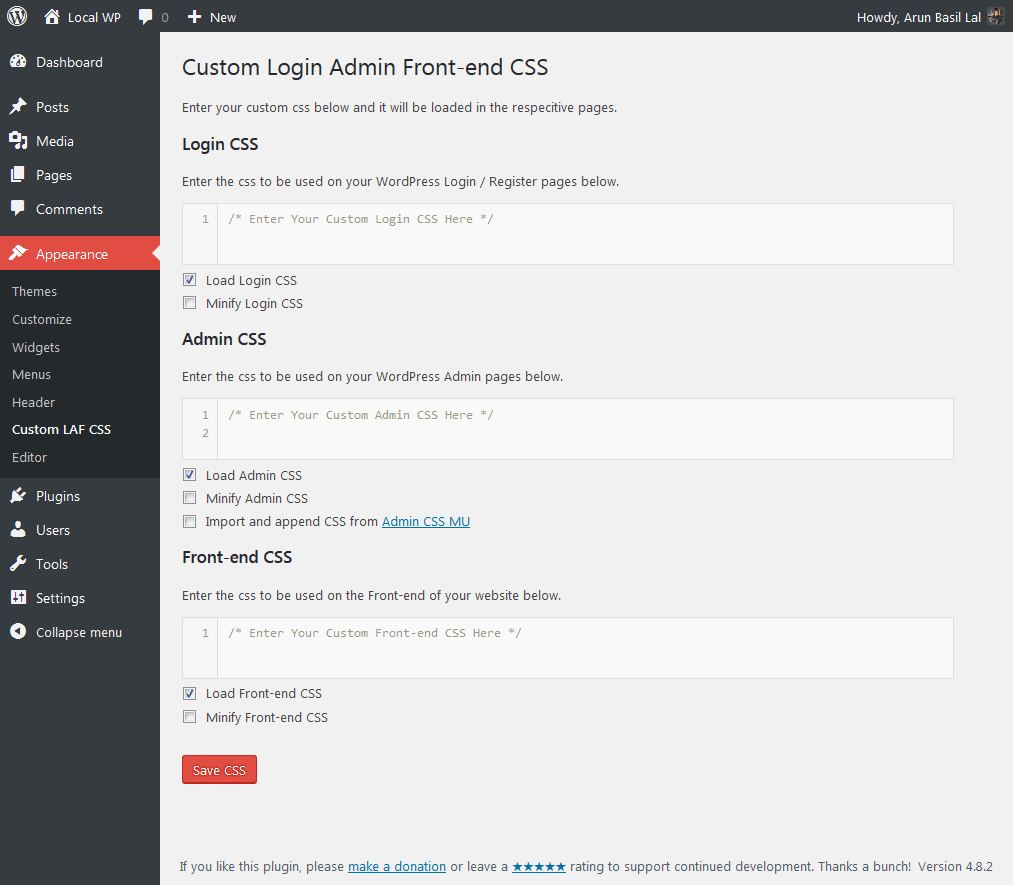
Admin Interface in Appearance > Custom LAF CSS
Instalim
For WordPress single install:
- Install the plugin through the WordPress admin interface, or upload the folder /custom-login-admin-frontend-css/ to /wp-content/plugins/ using ftp.
- Activate the plugin via WordPress admin interface.
- Go to WordPress Admin > Appearance > Custom LAF CSS and add the custom CSS you want.
For Multisite:
- Install the plugin through the WordPress admin interface, or upload the folder /custom-login-admin-frontend-css/ to /wp-content/plugins/ using ftp.
- Network activate the plugin via WordPress admin interface.
- In the base website go to WordPress Admin > Appearance > Custom LAF CSS and add the custom CSS you want.
PBR
-
Some CSS Samples
-
To change the size of the h1 tags in WordPress Admin add this to Admin CSS:
h1 {
    font-size: 40px !important;
}
To change the background color of the Login Page, add this to Login CSS:
.login { background: #ECCFFF !important; } -
I found this plugin very useful, how can I show my appreciation?
-
I am glad to hear that! You can either make a donation or leave a rating to support the development of the plugin.
Shqyrtime

Kontribues & Zhvillues
“Custom Login Admin Front-end CSS” është software me burim të hapur. Në këtë shtojcë kanë dhënë ndihmesë personat vijues.
Kontribues
Përkthejeni “Custom Login Admin Front-end CSS” në gjuhën tuaj.
Ju intereson zhvillimi?
Shfletoni kodin, shkarkoni depon SVN, ose pajtohuni përmes RSS-je te regjistri i zhvillimeve.
Regjistër ndryshimesh
1.8
- Date: 04.October.2023
- Tested with WordPress 6.3.1
- Enhancement: Added compatibility with PHP 8.x
1.7
- Date: 16.May.2023
- Tested with WordPress 6.2
- Enhancement: Added support for
justify-content.align-items, andflex-wrapin CSSTidy.
1.6
- Date: 9.February.2023
- Tested with WordPress 6.1.1
- Enhancement: Added support for
flex-directionin CSSTidy.
1.5
- Date: 19.October.2022
- Tested on WordPress 6.0.3.
- Security Fix: Deleted unwanted files in CSSTidy. Thanks Darius from Patchstack for the heads up.
1.4.1
- Date: 17.May.2021
- Fixed compatibility issue with Admin CSS MU where redeclaration of Class csstidy caused PHP Fatal error.
1.4
- Date: 17.May.2021
- Tested on WordPress 5.7.2.
- Updated CSSTidy to v1.7.3.
- Added support for CSS properties grid-gap and grid-template-columns.
- Fix PHP warning: PHP Warning: “continue” targeting switch is equivalent to “break” in class.csstidy.php on line 859
1.3.1
- Date: 21.September.2017
- Tested on WordPress 4.8.2. Result = Pass
- Minor corrections in the settings page text.
1.3
- Date: 29.August.2017
- Tested upto WordPress 4.8.1. Result = Pass
- Updated CSSTidy classes to meet PHP 7.x standards. Thanks
- New: Added options to enable or disable Login, Admin and Front-end CSS individually.
- New: Added option to minify CSS. CSS is only minified during use and the CSS editor will show the un-minified and more readable version for easy editing.
- New: Added option to import Admin CSS from Admin CSS MU. This will help with easy migration from Admin CSS MU to this plugin.
- Fixed: Conflict with Admin CSS MU plugin.
- Code improvements.
1.2
- Minor bug fixes.
- Tested upto WordPress 4.7.
1.01
- Added complete multisite compatibility.
1.0
- First release of the plugin.