

Përshkrim
Trustie brings reviews, testimonials, and Google Business reviews to any WordPress site.
Use it standalone for testimonials and Google reviews — no WooCommerce needed. Or pair it with WooCommerce for product reviews, star ratings, and automated review request emails. Everything stored in your database, on your server.
Trustie is the free foundation of the Tracksies plugin family — and it’s a proper plugin, not a free-tier trap. No feature limits. No “upgrade to unlock.” No monthly fees. Just reviews that work.
Works Without WooCommerce
- Google Reviews — Display your Google Business reviews with star ratings, author names, and schema markup for rich results
- Testimonials — Collect testimonials through a customisable form. Display in grid, list, masonry, or slider layouts
- Floating Widget — A slide-out panel showing your latest reviews from all sources on every page
- Reviews Page — A dedicated /reviews/ page with tabs, filtering, and pagination. Works automatically
- Visual Designer — Customise colours, star styles, and branding from Trustie > Designer. Detects colours from your active theme
With WooCommerce
Everything above, plus:
- Product Reviews — Replace WooCommerce’s default reviews with better-looking cards, star summaries, and rating breakdowns
- Star Ratings — Display average ratings anywhere with shortcodes. Lightweight loop stars for product archives
- Review Request Emails — Automatically email customers after purchase asking for a review
- Convert Comments to Reviews — Turn existing WordPress product comments into star-rated reviews
- Sync Product Ratings — Recalculate averages and counts across all products
Import Tools
- Import Testimonials — Auto-detects and imports from Strong Testimonials, Easy Testimonials, and Starter Templates
- Convert Product Comments — One-click conversion from product comments to proper star-rated reviews
Accessibility
Trustie is built with accessibility in mind: keyboard navigation, visible focus indicators, screen reader announcements for form submissions and content loading, and descriptive labels on interactive controls. We test against WCAG guidelines and actively work to improve accessibility with every update.
Shortcodes
Google Reviews (no WooCommerce needed)
[trustie_google_reviews]— Display your Google Business reviews with aggregate rating and schema markup
Testimonials (no WooCommerce needed)
[trustie_testimonials]— Display testimonials in grid, list, or masonry layout[trustie_testimonial_form]— Customer testimonial submission form[trustie_testimonial_slider]— Auto-advancing testimonial carousel[trustie_testimonial_grid]— Grid layout wrapper
Product Reviews (WooCommerce required)
[trustie_reviews]— Reviews for a specific product with optional form and summary[trustie_all_reviews]— Reviews from all products in a grid[trustie_reviews_page]— Full reviews page with pagination[trustie_review_form]— Standalone review submission form[trustie_rating]— Average star rating for a product[trustie_rating_badge]— Compact rating badge (stars + count)[trustie_loop_stars]— Lightweight stars for product archives
Every shortcode accepts optional attributes for customisation. See the shortcode reference for full details.
Part of the Tracksies Family
Trustie is the free starting point. When you’re ready for more, the rest of the family is here:
- Trustie Pro — Photo reviews, Q&A, custom forms, multi-step email sequences, import from Judge.me/Yotpo/Stamped, Google Merchant feed
- Tracksies HQ — Customer intelligence, order management, priority rules, returns, branded emails and PDF invoices
- Packsie — Warehouse dashboard and staff management
- Perkie — Loyalty points, VIP tiers, referrals
- Squizzie — Analytics, Google integrations, branded PDF reports
- Pipesie — CRM and pipeline for service businesses
Every Tracksie connects to every other Tracksie. Your review data flows into customer profiles, informs loyalty tiers, feeds analytics — automatically.
Visit tracksies.com to meet the family.
Documentation
Full documentation is available at docs.tracksies.com.
Privacy
Trustie uses the Appsero SDK for optional, opt-in diagnostic data collection. This helps us troubleshoot issues and improve the plugin.
- Tracking is disabled by default. Data is only collected after you explicitly allow it via the admin notice on activation.
- What is collected (when opted in): Active theme and PHP version.
- When: Once per week via a scheduled event, only if opted in.
- You can opt out at any time from the admin notice or plugin settings.
Appsero Terms of Service | Appsero Privacy Policy
External Services
This plugin connects to the following external services:
Google Places API
Trustie uses the Google Places API to retrieve your Google Business reviews for display on your site.
- What data is sent: Your Google API key and Place ID (both configured by you in plugin settings)
- When: When a page containing the
[trustie_google_reviews]shortcode is loaded, or when you test the connection from Settings > Google Reviews. Results are cached for 24 hours to minimise requests - No visitor data is sent to Google — only your business credentials are used to fetch your own reviews
Google Terms of Service | Google Privacy Policy
Appsero
Trustie uses the Appsero SDK for optional, opt-in diagnostic data collection.
- Tracking is disabled by default. Data is only collected after you explicitly allow it via the admin notice shown on plugin activation
- What data is sent (when opted in): Site URL, admin email, WordPress version, PHP version, server environment details, active plugin/theme information, and plugin version
- When: Once per week via a scheduled event, only if you have opted in
- You can opt out at any time from the admin notice or plugin settings
Appsero Terms of Service | Appsero Privacy Policy
icanhazip.com (Cloudflare)
When you opt in to Appsero diagnostic tracking (see above), Trustie uses icanhazip.com to determine your server’s public IP address for environment diagnostics. This service is operated by Cloudflare, Inc..
- What data is sent: A simple HTTP GET request with no payload
- When: Only when you have opted into Appsero tracking. Not called if tracking is disabled (the default)
- What is returned: Your server’s public IP address, which is included in the Appsero diagnostic data
Foto ekrani
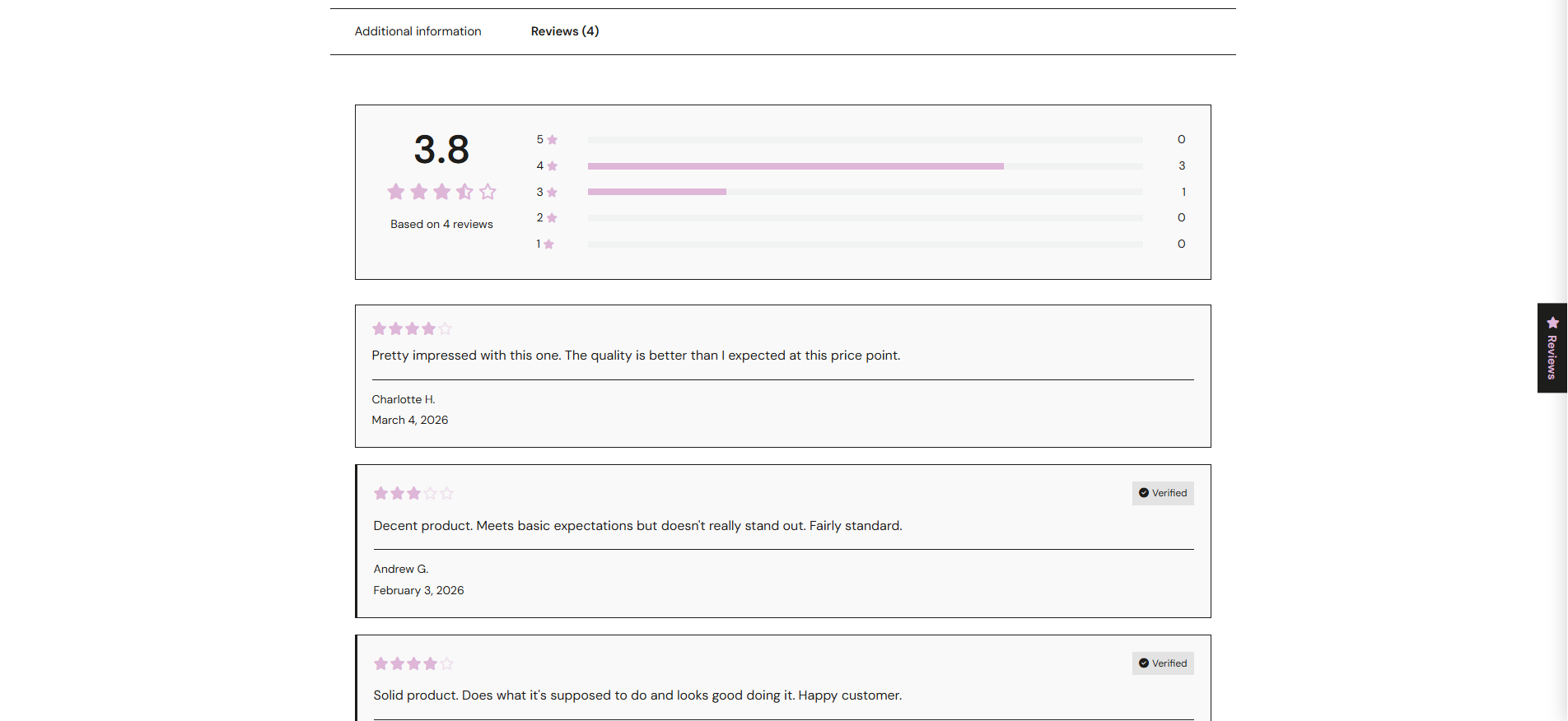
Product reviews with aggregate star rating, rating breakdown, and review cards with verified purchase badges 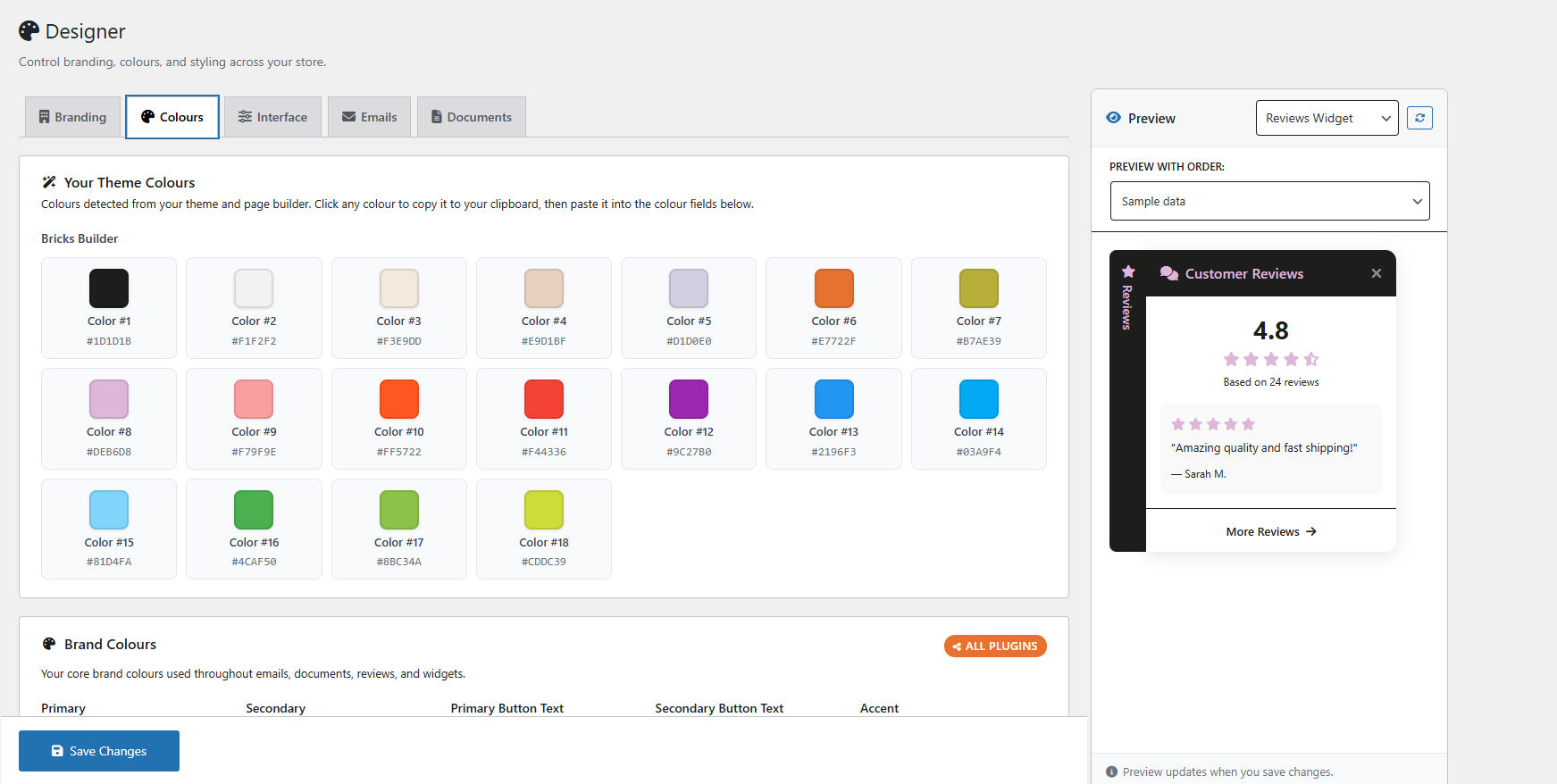
Visual Designer — customise brand colours, star styles, and UI appearance with live preview 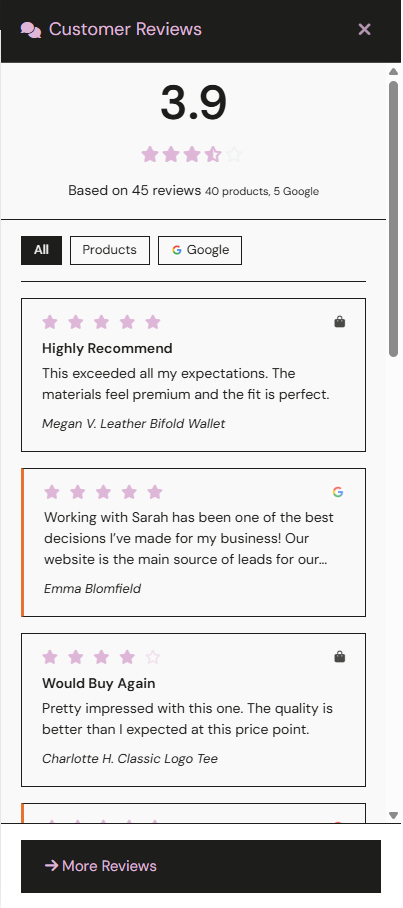
Floating review widget showing reviews from all sources with tabs for Products and Google 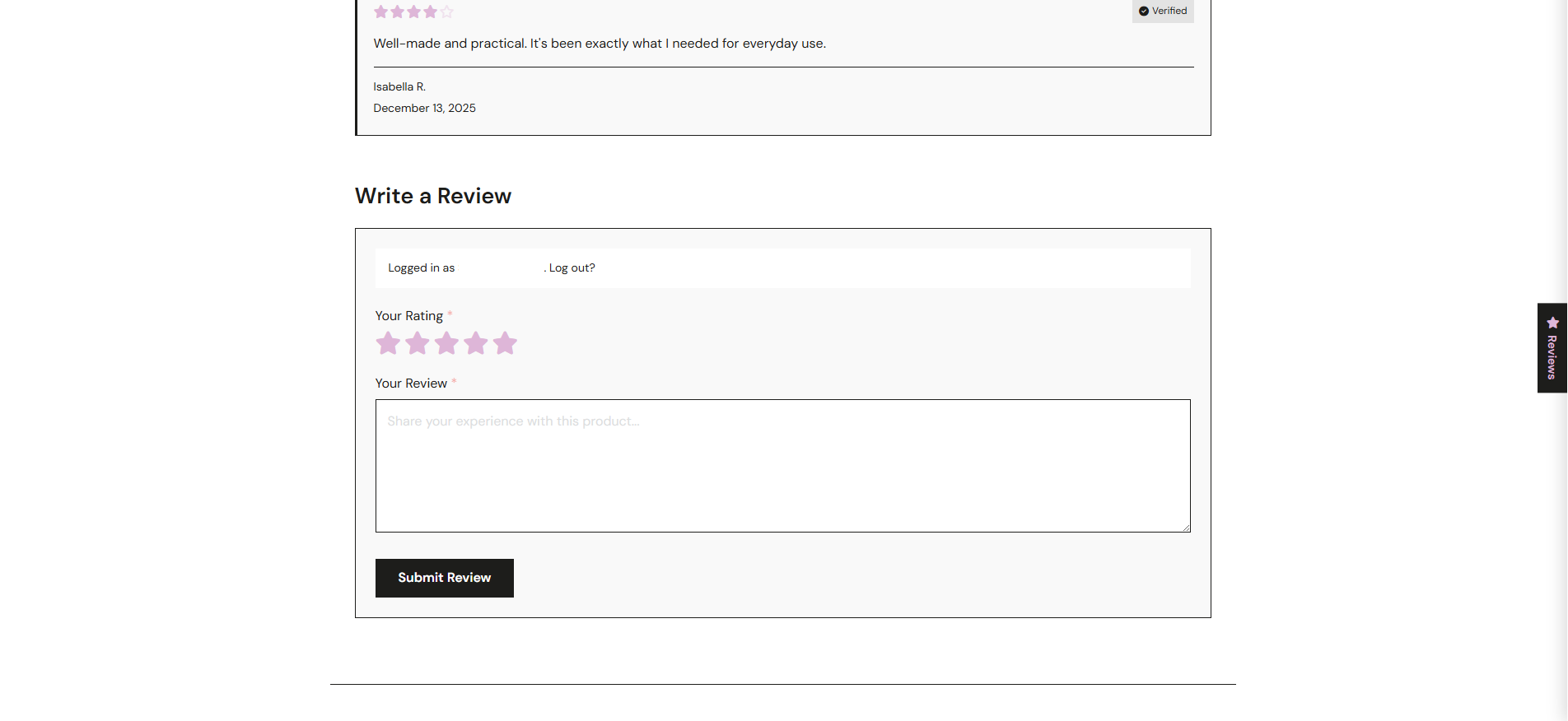
Review submission form with star rating selector and the floating widget alongside 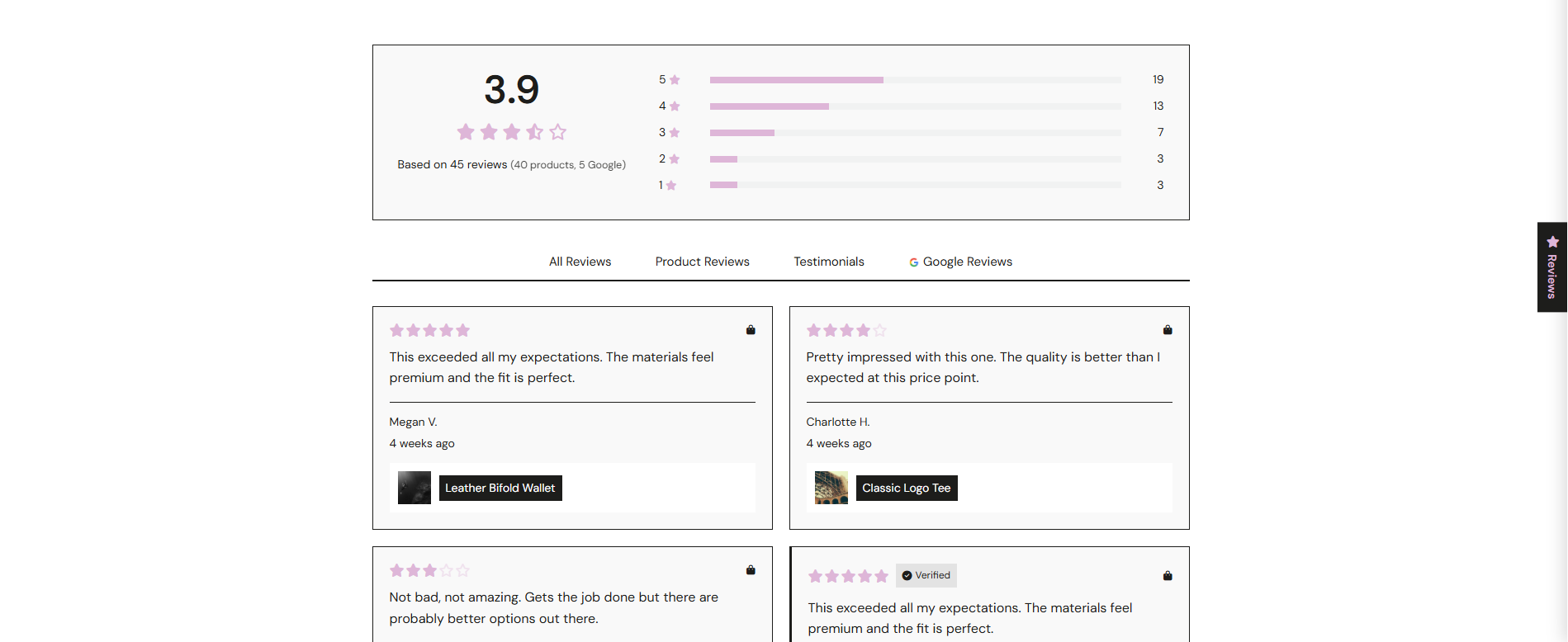
Reviews page with tabs for All Reviews, Product Reviews, Testimonials, and Google Reviews 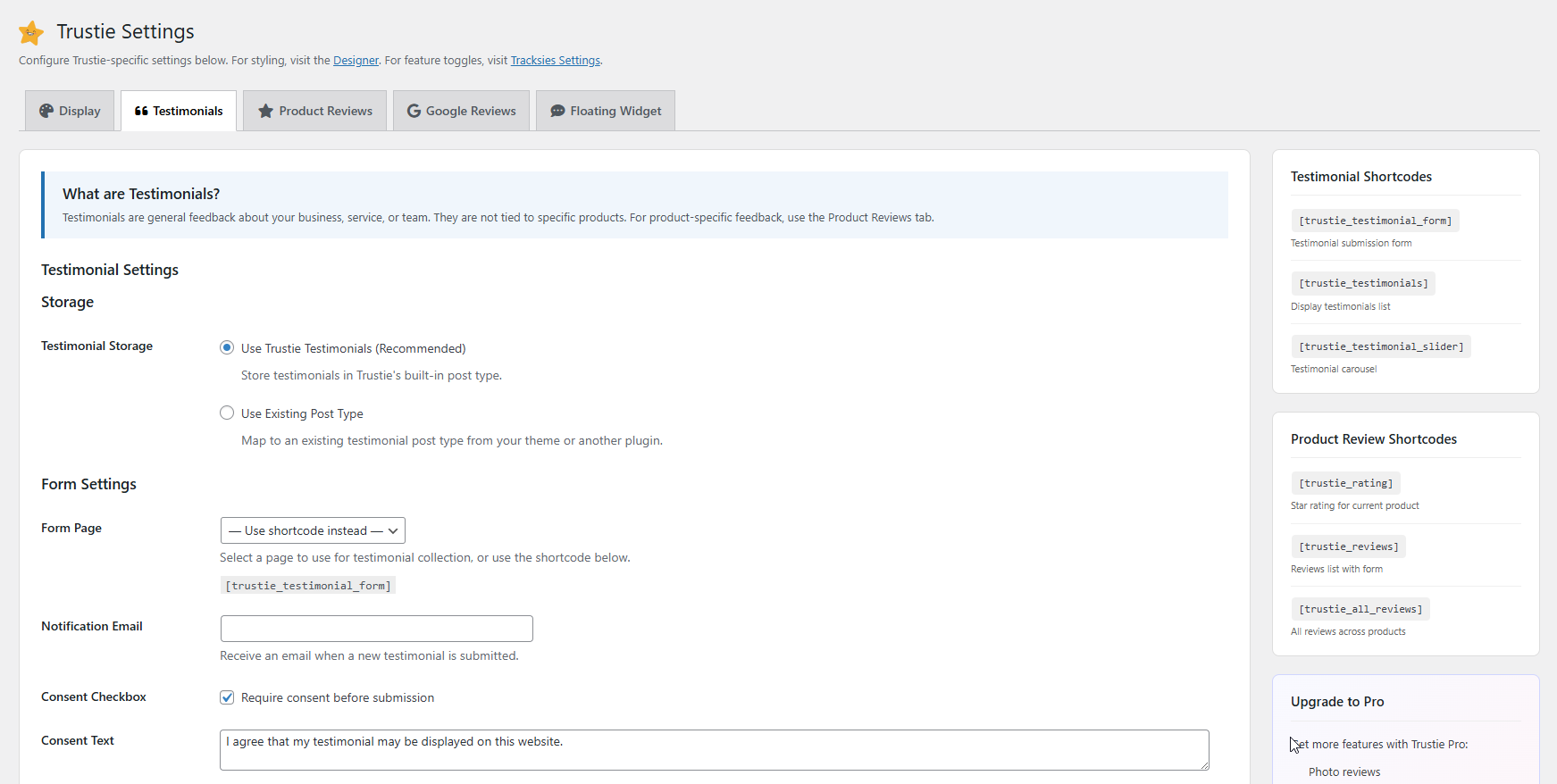
Settings page — testimonial configuration, form settings, shortcode reference sidebar 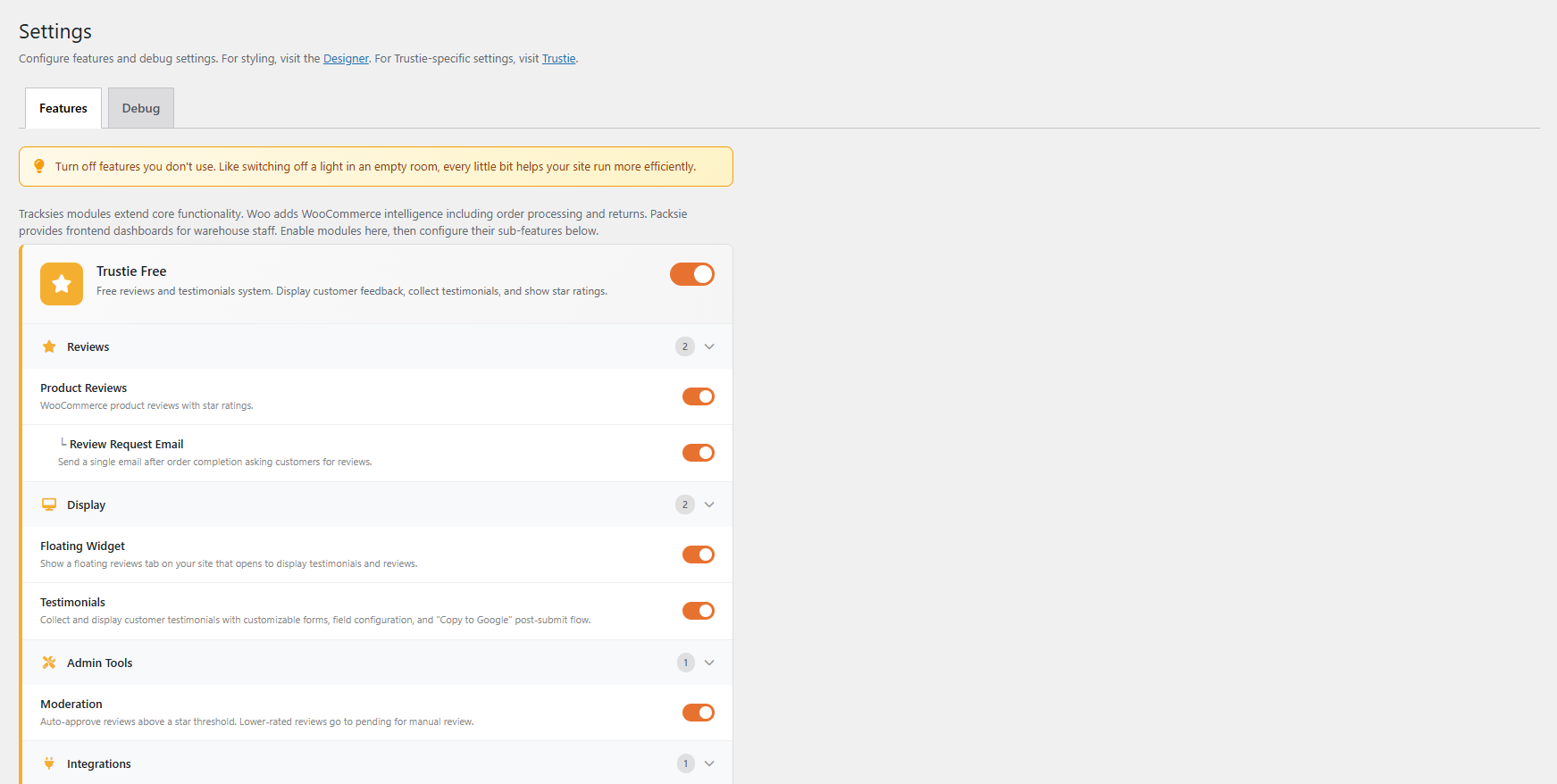
Feature toggles — enable or disable individual Trustie features from the Settings panel 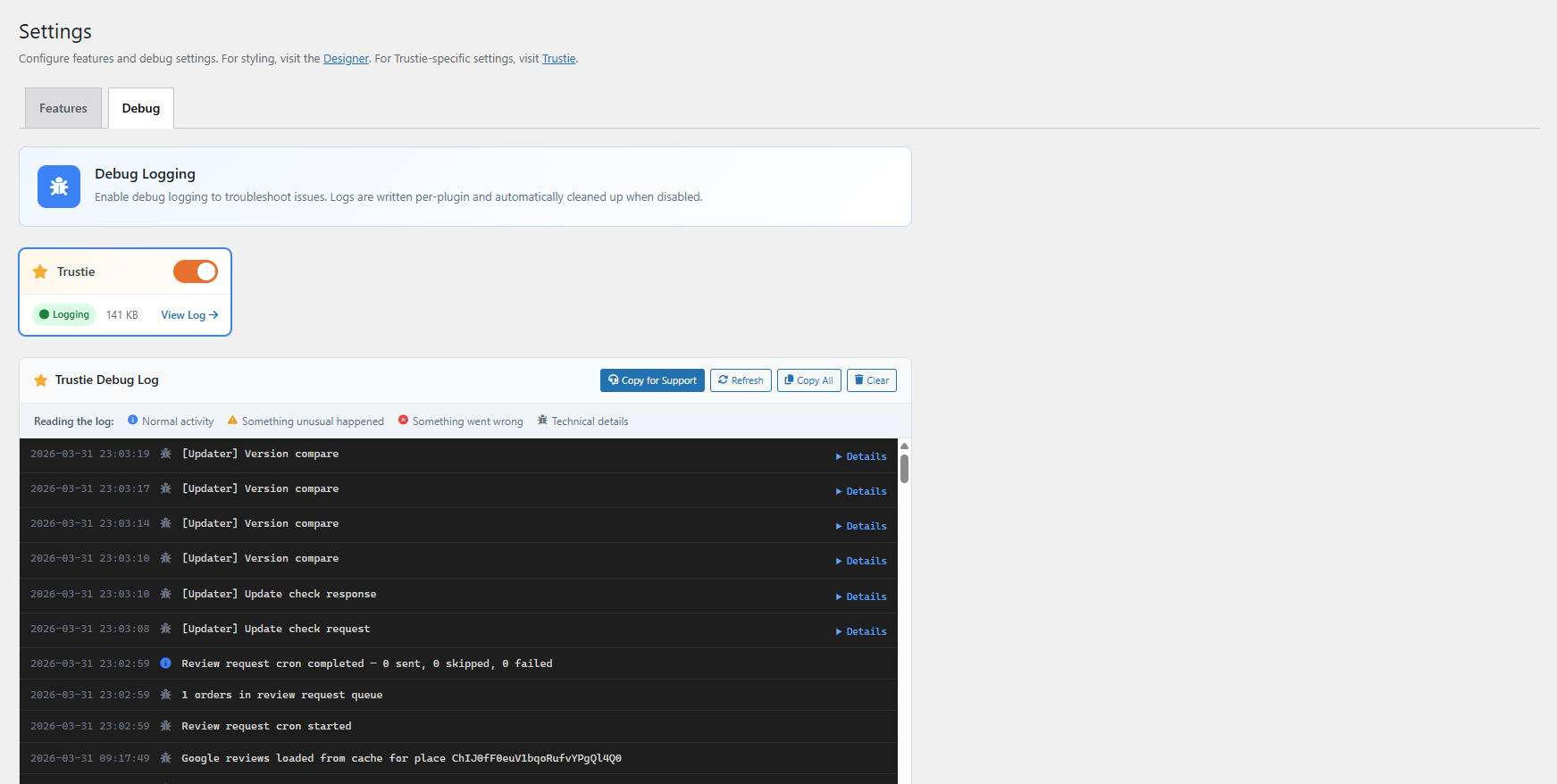
Debug logging — built-in diagnostic log with colour-coded entries for troubleshooting 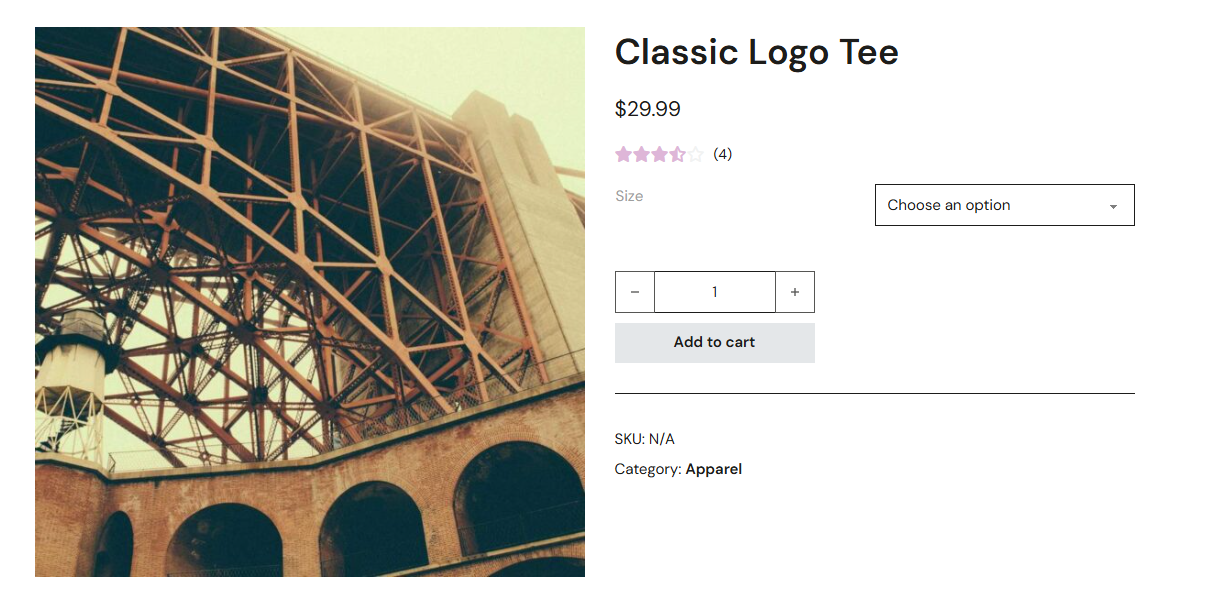
Product page star rating display on a WooCommerce product
Instalim
- Upload the
trustiefolder to/wp-content/plugins/or install directly from the WordPress plugin directory - Activate the plugin through the Plugins menu in WordPress
- Go to Trustie > Settings to configure your preferences
- For Google Reviews: add your API key and Place ID in Settings > Google Reviews
- Use shortcodes to display reviews and testimonials on any page or post
For detailed setup instructions, see the installation guide.
PBR
-
Does this work without WooCommerce?
-
Yes. Trustie works on any WordPress site. You get testimonials, Google Reviews, the floating widget, the reviews page, and the visual designer — no WooCommerce required. WooCommerce adds product reviews, star ratings, and review request emails.
-
How do I show Google reviews?
-
Add your Google API key and Place ID in Trustie > Settings > Google Reviews, then use the
[trustie_google_reviews]shortcode on any page. Full setup guide: Connecting Google Reviews -
Can I customise the colours and styling?
-
Yes — Trustie has a built-in visual Designer (Trustie > Designer) where you can set brand colours, star styles, border radius, shadows, and more. It detects colours from your active theme automatically. Designer guide
-
Does this replace WooCommerce’s built-in reviews?
-
Trustie enhances them. It uses WooCommerce’s native review system but gives you better-looking review cards, star summaries, rating breakdowns, and display shortcodes. Your existing reviews keep working.
-
Can testimonials be auto-approved?
-
Yes. Set a star rating threshold in settings — testimonials at or above that rating publish automatically. Below it, they go to moderation.
-
Does Trustie help with SEO?
-
Yes. Google Reviews output JSON-LD LocalBusiness and AggregateRating schema automatically. Testimonials output Review schema. WooCommerce product reviews use standard WooCommerce schema. All of this helps search engines display rich results with star ratings.
-
Is the testimonial form spam-protected?
-
Yes. Trustie includes honeypot spam protection on the testimonial submission form. You can also require a minimum star rating and moderate submissions manually.
-
Can I import testimonials from another plugin?
-
Yes. Trustie auto-detects Strong Testimonials, Easy Testimonials, and Starter Templates and offers one-click import. You can keep or remove the originals. Import tools guide
-
How do I convert product comments to reviews?
-
Go to Trustie > Settings > Import. If you have existing WordPress comments on WooCommerce products, Trustie can convert them to proper star-rated reviews with a configurable default rating. One click.
-
How do review request emails work?
-
When a WooCommerce order is marked complete, Trustie can automatically send an email asking the customer to leave a review. You set the delay (days after order), customise the email content with placeholders, and Trustie handles the rest. Email setup guide
-
What happens if I upgrade to Trustie Pro?
-
All your existing settings, reviews, and testimonials stay exactly as they are. Pro adds features on top — photo reviews, Q&A, custom forms, multi-step email sequences, advanced moderation, and import from Judge.me, Yotpo, and Stamped. If you ever deactivate Pro, everything gracefully falls back to Free. See what Pro adds
-
Where is my data stored?
-
In your WordPress database. On your server. Trustie is fully self-hosted — no external servers, no API calls to our infrastructure, no data leaving your site. If you uninstall Trustie, your reviews and testimonials remain in your database.
-
Is Trustie accessible?
-
We’ve built Trustie with accessibility as a priority — keyboard navigation, visible focus indicators, screen reader announcements, and descriptive aria-labels throughout. We test against WCAG 2.1 AA guidelines and actively work to improve accessibility with every update. If you find something we’ve missed, please let us know.
Shqyrtime
Për këtë shtojcë s’ka shqyrtime.
Kontribues & Zhvillues
“Trustie” është software me burim të hapur. Në këtë shtojcë kanë dhënë ndihmesë personat vijues.
Kontribues
Përkthejeni “Trustie” në gjuhën tuaj.
Ju intereson zhvillimi?
Shfletoni kodin, shkarkoni depon SVN, ose pajtohuni përmes RSS-je te regjistri i zhvillimeve.
Regjistër ndryshimesh
1.1.9
- Fix: floating widget tab no longer uses same gold as star ratings — now uses dark charcoal with white text for clear visual distinction out of the box
- Privacy: reviewers can now choose their display name instead of using their WordPress account name
- Display Name field shown for both logged-in and guest reviewers
1.1.0
- Initial public release
- Google Reviews with JSON-LD schema markup for rich results
- Testimonials with customisable submission form and auto-approval
- WooCommerce product reviews with star summaries and rating breakdowns
- Review request emails with configurable timing and smart cancellation
- Floating review widget showing reviews from all sources
- Dedicated reviews page with tabs, filtering, and pagination
- Visual Designer with theme colour detection
- Import tools for Strong Testimonials, Easy Testimonials, and Starter Templates
- Comment-to-review conversion for WooCommerce
- Product rating sync
- Feature toggles for granular control
- Built-in debug logging
- WCAG 2.1 AA accessibility throughout